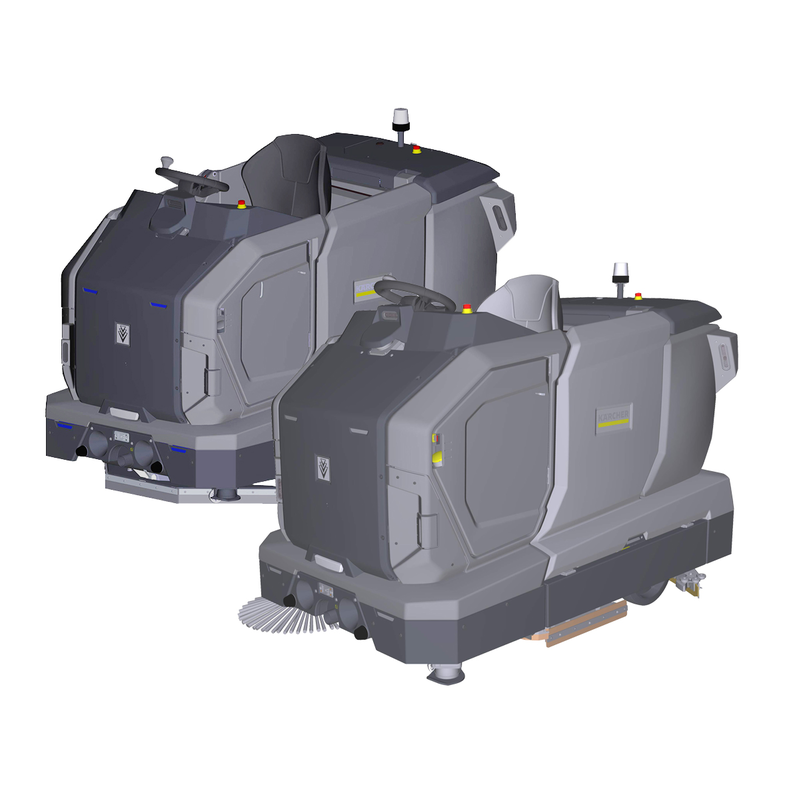
KIRA B 200
59803270 (06/25)
59803270 (06/25)
READ ALL INSTRUCTIONS BEFORE USING THIS APPLIANCE
To reduce the risk of fire, electric shock, or injury:
DO NOT LEAVE appliance unattended when plugged in. Unplugfrom outlet when not in use and before servicing.TO REDUCE THE RISK OF ELECTRIC SHOCK-USE INDOORS ONLY
DO NOT USE FOR CLEANING PURPOSES ON SURFACES HAVING A GRADIENT EXCEEDING THAT MARKED ON THE MACHINE
THE MACHINE SHALL BE PARKED SAFELY
Do not allow to be used as a toy. Close attention is necessary when used by or near children.
Use only as described in this manual. Use only manufacturer’s recommended attachments.
Do not use with damaged cord or plug. If the unit is not working as it should, has been dropped, damaged, left outdoors, or dropped into water, return it to a service center.
Do not pull or carry by the cord, do not use cord as a handle, do not close a door on the cord, or pull cord around sharp edges or corners. Do not run appliance over cord. Keep cord away from heated surfaces.
DO NOT UNPLUG BY PULLING CORD. To unplug, grasp plug, not cord.
Do not handle plug or appliance with wet hands.
Do not put any objects into openings. Do not use if openings are blocked; keep free of dust, lint, hair, and anything that may reduce air flow.
KEEP HAIR, CLOTHING, LOOSE JEWELRY, FINGERS and all parts of the body away from openings and moving parts.
Turn off all controls before unplugging.
Use extra care when cleaning on stairs.
Do not use to pick up flammable or combustible liquids, such as gasoline, or use in areas where they may be present.
Connect to a properly grounded outlet only. See Grounding Instructions.
Always disconnect cord from electrical outlet before servicing appliance.
Never sweep off explosive liquids, combustible gases or undiluted acids and solvents. This includes petrol, paint thinner or heating oil which can generate explosive fumes or mixtures upon contact with the air. Acetone, undiluted acids and solvents must also be avoided as they can harm the materials on the machine.
Do not vacuum up burning or smouldering objects!
This device must be grounded. If it should malfunction or break down, grounding provides a path of least resistance for electric current to reduce the risk of electric shock.
This device is equipped with a cord having an equipment grounding conductor and ground plug.
The plug must be plugged into an appropriate outlet that is properly installed and grounded in accordance with all local codes and ordinances.
Improper connection of the equipment grounding conductor can result in a risk of electrocution.
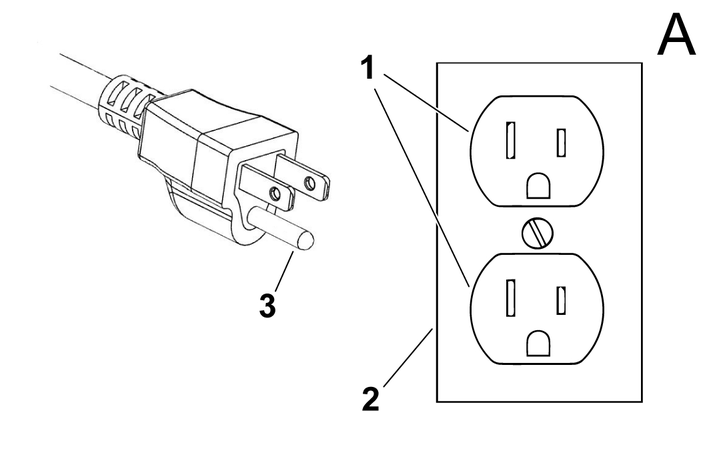
Check with a qualified electrician or service personnel if you are in doubt as to whether the outlet is properly grounded.Do not modify the plug provided with the product - if it will not fit the outlet, have a proper outlet installed by a qualified electrician.Do not use any type of adapter with this product.This appliance is for use on a nominal 120-volt circuit and has a grounding attachment plug that looks like the plug illustrated in Figure A.Make sure that the appliance is connected to an outlet having the same configuration as the plug.No adaptor should be used with this appliance.CONNECT TO A PROPERLY GROUNDED OUTLET ONLY
The owner and/or user must have an understanding of the manufacturer’s operating instructions and warnings before using this device.
Warning information should be emphasized and understood.
If the operator is not fluent in English, the manufacturer’s instructions and warnings shall be read to and discussed with the operator in the operator’s native language by the purchaser/ owner, making sure that the operator comprehends its contents.
Owner and/or user must study and maintain for future reference the manufacturers’ instructions.
Before starting operation, the device must be in the operating position.
Do not start or operate the device, any of its functions or attachments, from any place other than from the designated operator's position.
Before leaving the operator’s position:
bring the device to a complete stop;
if the device must be on an incline, block the wheels.
Maintain a safe distance from the edge of ramps, platforms, and other similar working surfaces.
Do not add to, or modify the device.
Do not block access to fire aisles, stairways or fire equipment.
Yield the right of way to pedestrians and emergency vehicles such as ambulances and fire trucks.
Cross railroad tracks at an angle wherever possible. Do not park closer than 6 ft (1800 mm) to the nearest rail of a railroad track.
Keep a clear view of the path of travel and observe for other traffic, personnel, and safe clearances.
Under all travel conditions, operate the device at a speed that will permit it to be brought to a stop in a safe manner.
Do not indulge in stunt driving or horseplay.
Slow down for wet and slippery floors. Before driving over a dockboard or bridge plate, be sure that it is properly secured. Drive carefully and slowly across the dockboard or bridge plate, and never exceed its rated capacity.
When negotiating turns, reduce speed to a safe level consistent with the operating environment. Make the turns smoothly.
If the device is found to be in need of repair or in any way unsafe, or contributes to an unsafe condition, the matter shall be reported immediately to the user’s designated authority, and the device shall not be operated until it has been restored to safe operating condition.
If during operation the device becomes unsafe in any way, the matter shall be reported immediately to the user’s designated authority, and the device shall not be operated until it has been restored to safe operating condition.
Do not make repairs or adjustments unless specifically authorized to do so.
Operation of the device may be hazardous if maintenance is neglected or repairs, rebuilds, or adjustments are not performed in accordance with the manufacturer’s design criteria. Therefore, maintenance facilities (on or off premises), trained personnel, and detailed procedures shall be provided.
Maintenance and inspection of the device shall be performed in conformance with the following practices:
a scheduled planned maintenance, lubrication, and inspection system shall be followed; consult the manufacturer’s recommendations.
Only trained and authorized persons shall be permitted to operate a powered floor scrubber. Operators of powered floor scrubbers shall be qualified as to visual, auditory, physical, and mental ability to operate the equipment safely.
Avoid fire hazards and have fire protection equipment present in the work area. Do not use open pans of fuel or flammable cleaning fluids for cleaning parts.
Any device not in safe operating condition shall be removed from service.
Repairs shall not be made in Class I, Class II, and Class III locations.
Fire Prevention.The device shall be kept in a clean condition and reasonably free of lint, excess oil, and grease.
Noncombustible agents are preferred for cleaning the device. Flammable liquids [those having flash points at or above 100°F (37,8°C)] are not allowed. Precautions regarding toxicity, ventilation, and fire hazard shall be appropriate for the agent or solvent used.
Nameplate Visibility. The device type designations as shown on the nameplate and the type markers shall not be covered over with paint so that their identification information is obscured.
 Read these original operating instructions and the enclosed safety instructions before using the device for the first time. Proceed accordingly.
Keep both books for future reference or for future owners.
These instructions are intended for the user groups of normal users and supervisors.
Each user can be granted or denied permissions for various device functions via the touch screen of the device.
All descriptions in this manual refer to the standard settings suggested in the device for the respective user group.
These operating instructions describe the hardware components of the device.
The focus here is on issues relating to the manual mode, care and service as well as troubleshooting.
The software functions are described in separate operating instructions.
These software instructions can be found in the help section of the user interface and online at
www.karcher.com
This scouring and vacuum machine is used for autonomous wet cleaning of level floors.
The device follows previously learnt cleaning tasks independently of operator intervention.
It is controlled by software that uses extensive sensor technology to perceive its environment and adapt its driving behaviour to the situation at hand.
This scouring and vacuum machine can also be used for manual cleaning.
This device is suitable for commercial and industrial use, For example, in factories, in warehouses and logistics areas or in large event rooms. Use the device only in accordance with the information in these operating instructions.
The device may only be used for cleaning smooth surfaces that are insensitive to water and polishing.
The device is designed for indoor use.
This device is only suitable for use in dry areas.
The operational temperature range is between +5 °C and +40 °C.
The device is not suitable for cleaning frozen floors (e.g. in cold stores).
The device is suitable for maximum water height of 1 cm. Do not drive into an area if there is a danger of exceeding the maximum water height.
When using chargers or batteries, only the components approved in the operating instructions may be used. A different combination must be confirmed by the responsible supplier of the charger and/or battery.
The device is not intended for cleaning public traffic routes.
The device must not be used on pressure-sensitive floors. Take into account the permissible load per unit area of the floor. The load per unit area caused by the device is specified in the technical data.
The device is not suitable for use in potentially explosive environments.
The device is approved for operation on surfaces with a maximum incline (see "Technical Data").
Before using the device for the first time, read and observe these operating instructions and the complete operating instructions (in the device display).
Operate the device only when the lid, all flaps, doors, and the safety door are closed.
Press the emergency stop button for immediate shutting down in an emergency.
Only operate the device on surfaces that do not exceed the maximum permitted slope (see the "Technical data").
Do not place any part of your body between the docking station and the device during the docking process.
Indication of an imminent threat of danger that will lead to severe injuries or even death.
Indication of a potentially dangerous situation that may lead to severe injuries or even death.
Indication of a potentially dangerous situation that may lead to minor injuries.
Indication of a potentially dangerous situation that may lead to damage to property.
Wear suitable gloves when working with the device.
Risk of asphyxiation. Keep packaging film out of the reach of children.
Only use the device for its proper use. Take into account the local conditions and beware of third parties, in particular children, when working with the device.
The device is not intended for use by persons with restricted physical, sensory or mental abilities or those lacking in experience and / or lacking in knowledge.
Only people who have been instructed on how to use the device, or have proven their ability to operate it, and have been explicitly instructed to use it, must use the device.
Children must not operate the device.
Children must be supervised to prevent them from playing with the appliance.
Keep children and unauthorised persons away from the device.
Safety devices are provided for your own protection. Never modify or bypass safety devices.
Risk of injury from petrol cap and safety door!
Risk of injury to limbs and head due to unexpected closing of petrol cap and safety door.
When opening and closing petrol caps and safety doors, keep your limbs and head out of the danger zone.The voltage indicated on the type plate must match the voltage of the power source.
Never touch the mains plug and socket with wet hands.
Only connect protection class I devices to properly earthed power sources.
For safety reasons we recommend operating the device only via a fault current protection switch (maximum 30 mA).
Switch off the device immediately in the event of leaks.
In the case of any foam formation or escaping liquids, switch off the device immediately and remove the mains plug from the docking station or the charger.
Check that the mains connection cable with mains plug is undamaged each time before using the device. To avoid any possible danger, a damaged mains connection cable must be immediately replaced by the manufacturer, or the authorised customer service department or a qualified electrician.
Do not damage the power supply and extension cable by running over it, crushing or yanking it or similar. Protect the power supply cable from heat, oil and sharp edges.
Only use the mains connection cable prescribed by the manufacturer, including when replacing the cable. For order no. and type see operating instructions.
Do not allow the mains connection to come into contact with rotating brushes.
Only replace couplings on the power supply or extension cable with those with the same splash guard and the same mechanical strength.
Before startup, check the device as described in the chapter "Checking the device".
Observe the rules for autonomous operation as described in the chapter "Rules for autonomous operation".
When using the device in hazard zones (e.g. service stations), adhere to the respective safety regulations.
Operation in explosive atmospheres is prohibited.
Never spray or vacuum fluids, flammable gases, explosive dusts as well as undiluted acids and solvents. These include petrol, paint thinners or heating oil, which can form explosive vapours or mixtures through suction air turbulence, also acetone, undiluted acids and solvents because these attack the materials used in the machine.
Never use the device to extract any burning or smouldering objects.
Never use the device to vacuum up people or animals.
Do not use the device on slippery floors.
On inclined surfaces, do not exceed the value for the angle of inclination to the side and in the travel direction in the operating instructions.
Wear tight-fitting clothing to avoid being caught by rotating parts (no tie, no long, wide skirt, etc.).
Users must be adequately instructed in the use of the device.
Check the device and the accessories each time before operation, in particular the mains connection and extension cable, to make sure it is safe and working correctly. Pull out the mains plug in case of any damage and do not use the device.
Do not transport passengers with the device.
Never open the cover while the motor is running.
The device is not suitable for sucking dust that is harmful to health.
Do not operate the device at temperatures below 0 °C.
The device is not a vacuum cleaner. Do not extract more liquid than you sprayed. Never use the device for extracting dry dirt.
The device is only suitable for use on the coats listed in the operating instructions.
The device is suitable for damp to wet soil up to 1 cm water height. Do not drive into areas where the water height is more than 1 cm.
Observe the legal regulations when disposing of waste water and brine.
Do not use the device outdoors.
Keep the detergent out of the reach of children.
Never use the recommended detergents undiluted. These products are operationally safe since they do not contain any acids, alkali or substances that are harmful to the environment. Should detergents come into contact with eyes, rinse these out immediately and thoroughly using water and seek medical attention immediately. The same applies if detergents are swallowed.
Only use the detergents recommended by the manufacturer and observe the application, disposal and warning instructions of the detergent manufacturers.
Lithium-ion batteries are built into this device. These are subject to special criteria. Removal and installation as well as testing of defective batteries may only be carried out by Kärcher customer service or a qualified specialist.
For storage and transport instructions, please contact your Kärcher Customer Service.
Modifications and alterations to the device are not permitted.
You must not open the battery, there is a danger of a short circuit. Irritating vapours or corrosive liquids can also escape.
Do not expose the battery to strong sunlight, heat or fire. There is a danger of explosion.
Do not operate the charger in an explosion-hazard environment.
Do not use a dirty or wet charger.
Ensure sufficient ventilation during the charging process.
Danger of explosion. Keep naked flames away from the battery or the battery charging room, and do not generate sparks or smoke in the vicinity of a battery of a battery charging room.
Danger of explosion. Do not place any tools or objects on the battery, i.e. on the end poles and cell connectors.
Check the device and the mains cable for damage before each use. Do not use damaged devices and have damaged parts repaired by qualified personnel only.
Keep children away from batteries and charger.
Do not charge damaged batteries. Have damaged batteries replaced by Kärcher customer service.
Do not throw a defective battery in the household rubbish. Inform Kärcher Customer Service.
Avoid contact with fluid leaking from defective batteries. In case of accidental contact, rinse the liquid with water. In case of contact with the eyes, consult a doctor as well.
Be sure to observe these operating instructions. Adhere to the recommendations of the legislature regarding the handling of batteries.
The mains voltage must match the voltage indicated on the type plate of the device.
Operate the battery only with this device. It is forbidden and dangerous to use it for other purposes.
Unsuitable brushes endanger your safety. Only use the brushes supplied with the device or brushes recommended in the operating instructions.
Before cleaning, service, replacing parts and switching over to another function, you must switch off the device and remove the ignition key. Disconnect the mains plug on mains-operated devices. On battery-operated devices, pull the battery plug or disconnect the battery.
Have repair work, installation of spare parts and work on electrical components carried out by the authorised customer service only.
Repairs may only be carried out by approved customer service sites or staff qualified in this area who are familiar with all relevant safety instructions.
For wet application, the water level limiting device in the waste water tank must be cleaned regularly and checked for damage.
Pay attention to the safety inspection for mobile devices for industrial use in accordance with the locally applicable regulations
Short-circuits or other damage. Do not clean the device with a hose or high-pressure water jet.
Only use accessories and spare parts which are approved by the manufacturer. Only original accessories and original spare parts ensure that the appliance will run fault-free and safely.
Shut the motor down prior to transportation. Secure the device, taking into account its weight. See chapter Technical data in the operating instructions.
Missing or modified safety devices
Safety devices are provided for your own protection.
Never modify or bypass safety devices.The safety functions of the device are not affected in the absence of a network connection.
The device is equipped with a safety door and emergency stop buttons.
An operator must NOT stand on the device when in autonomous mode! Automatic docking in manual mode is an exception.
Risk of injury from moving device
In manual mode, there is a risk of the operator being injured by moving parts of the device or by surrounding objects.
Do not hold any parts of your body out of the device while it is moving.The device may only be operated when the lid, the equipment door and all flaps are closed. The safety door must be closed when in autonomous mode.
If the emergency stop button is pressed, all device functions are stopped immediately.
Risk of injury from electric current
The emergency stop button does not switch off the device or disconnect the electrical connections.
If the safety door is opened when in autonomous mode, the device stops.
When in autonomous mode, pressing the pause function (pause button on the back of the device or in the display) triggers an operating pause of 10 seconds.
The distance sensors detect obstacles and cause the device to circumnavigate the obstacles. The distance sensors comply with laser protection class 1 according to IEC 60825-1:2014.
The optical sensors detect obstacles and cause the device to circumnavigate the obstacles. The optical sensors comply with laser protection class 1 according to IEC 60825-1:2014.
This docking station is suitable for commercial and industrial use, For example, in factories, in warehouses and logistics areas or in large event rooms.
Users must be adequately instructed in the use of the docking station.
Use the docking station in dry areas only.
Unplug the docking station mains plug from the mains socket before carrying out any maintenance work.
Prevent the mains cable of the docking station from coming into contact with the rotating brushes of the floor cleaner.
Use the docking station indoors only
Store the docking station indoors only.
Observe the following warnings when handling the batteries:
 | Observe notes in the instructions of the battery, on the battery and in these operating instructions. |
 | Wear eye protection. |
 | Keep acids and batteries away from children. |
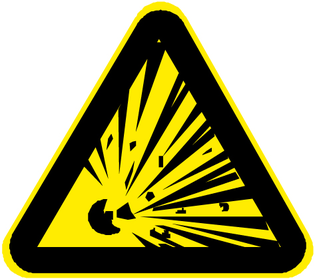 | Risk of explosion |
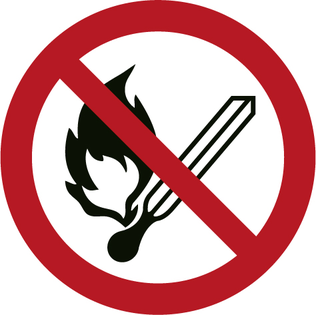 | Fire, sparks, open flames and smoking are prohibited. |
 | Risk of acid burns |
 | First aid. |
 | Warning |
 | Disposal |
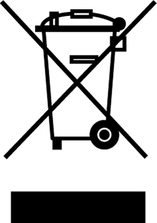 | Do not throw batteries in the bin. |
The packing materials can be recycled. Please dispose of packaging in accordance with the environmental regulations.
Electrical and electronic devices contain valuable, recyclable materials and often components such as batteries, rechargeable batteries or oil, which - if handled or disposed of incorrectly - can pose a potential danger to human health and the environment. However, these components are required for the correct operation of the device. Appliances marked by this symbol are not allowed to be disposed of together with the household rubbish.
Kärcher detergents are separator-friendly (ASF). That means the function of an oil separator is not impaired. A list of recommended detergents can be found in Chapter (→).
Notes on the content materials (REACH)Current information on content materials can be found at: www.kaercher.de/REACH
Only use original accessories and original spare parts. They ensure that the appliance will run fault-free and safely.
Information on accessories and spare parts can be found at www.kaercher.com.
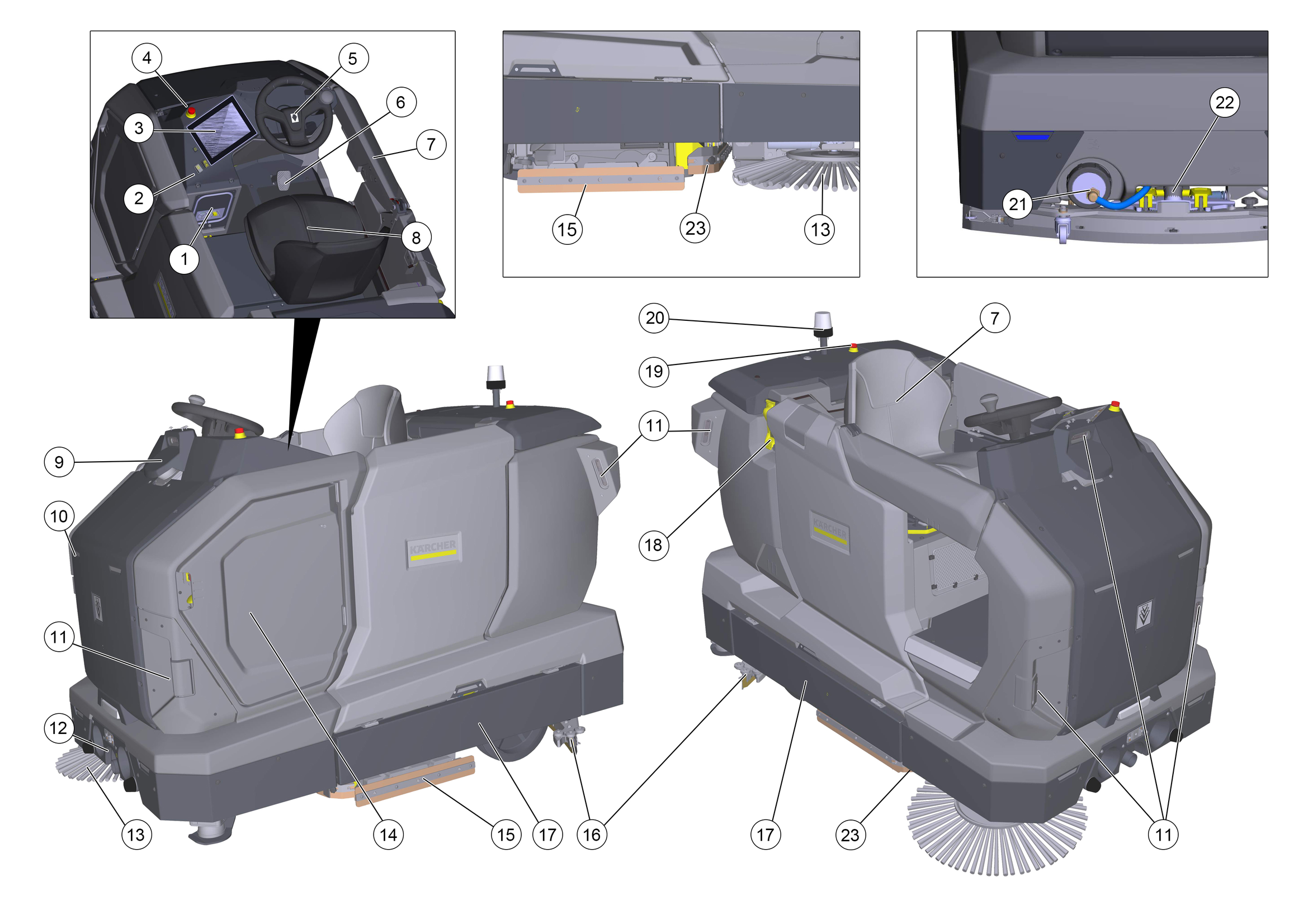
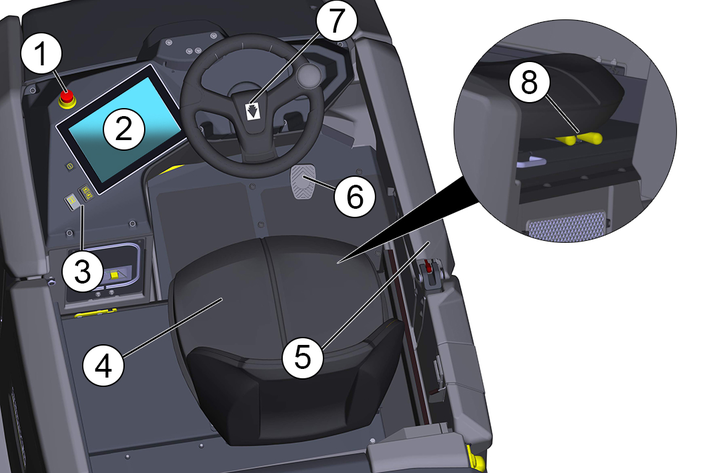
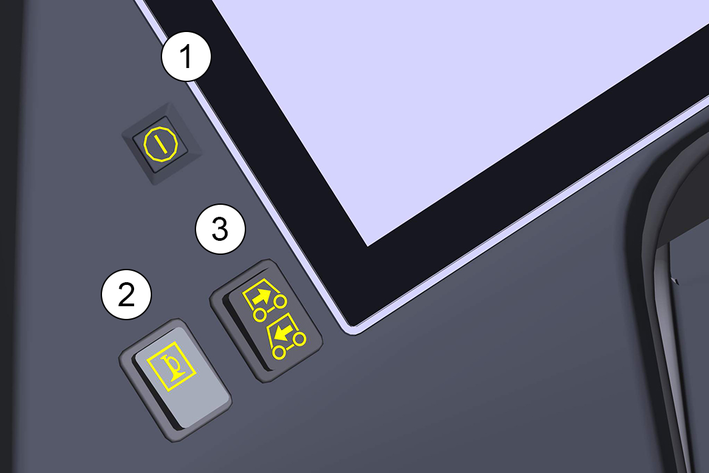
Switch group
The battery is automatically charged when operating with a docking station.
Without docking station:
Open the side device door.
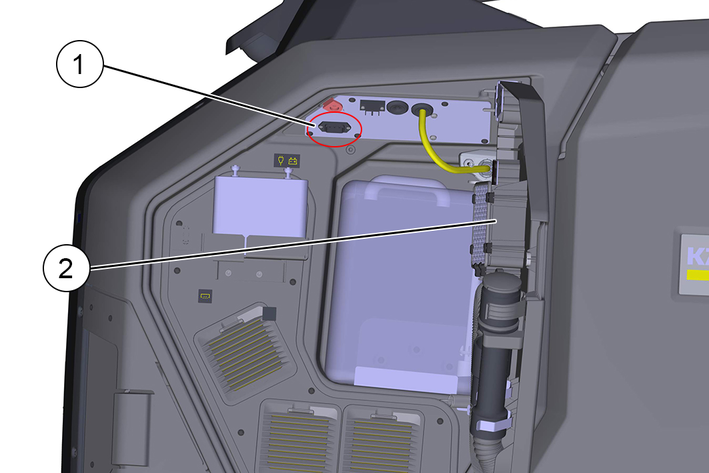
Remove the charging cable from the compartment.
Disconnect the plugged-in internal cable from the mains socket.
Plug the charging cable into the mains socket.
Plug the mains plug of the charging cable into a mains socket.
The charging process begins automatically.
The charging state is displayed on the touch screen.
The device cannot be used during the charging process.
When the battery is fully discharged, charging takes about 5 hours.
Unplug the mains plug from the socket after the charging process has finished.
Plug the internal cable back in.
Stow the mains cable in the device compartment or unplug the power cable.
After startup, the operating instructions of the device can be displayed on the touch screen. If the operating instructions are also downloaded to a smartphone, the operating steps can be read in parallel with the operation.
Scan the following code on the smartphone and follow the instructions to download the operating instructions.

The fresh water tank is automatically charged when operating with a docking station.
Without a docking station, the fresh water tank can be filled in two ways:
Connect the water hose to the connection nozzle of the filling system (maximum water temperature 50 °C).
Open the water inlet.
Monitor the device, the automatic filling system interrupts the water supply when the fresh water tank is full.
Close the water inlet.
Remove the water hose.
Insert the water supply hose into the filling hole next to the filling system. Observe the maximum water temperature of 50 °C!
Open the water inlet.
Observe the filling level and turn off the water supply when the tank is full.
Detergent is added to the fresh water on the way to the cleaning head by a dosing device.
Detergent dosing is stopped when the fresh water tank or detergent can is empty.
Open the side device door.
Remove the lid from the cleaning can.
Insert the suction lance of the dosing device into the opening of the can.
Place the can with the detergent into the holder.
Close the side device door.
The suction bar must be installed before initial startup.
The suction bar can be changed by the operator. Carry out the following steps for assembly/disassembly:
Removing the suction bar
Move the suction bar to the removal position using the service functions on the display.
Open the lock handles of the quick-release fasteners.
Remove the suction bar from the device (it is best to pull on the handles on one side).
Attach the suction bar
Use the service functions on the display to move the suction bar to the installation position (for easier installation, lower it slightly lower than when removing the suction bar).
Open the lock handles of the quick-release fasteners
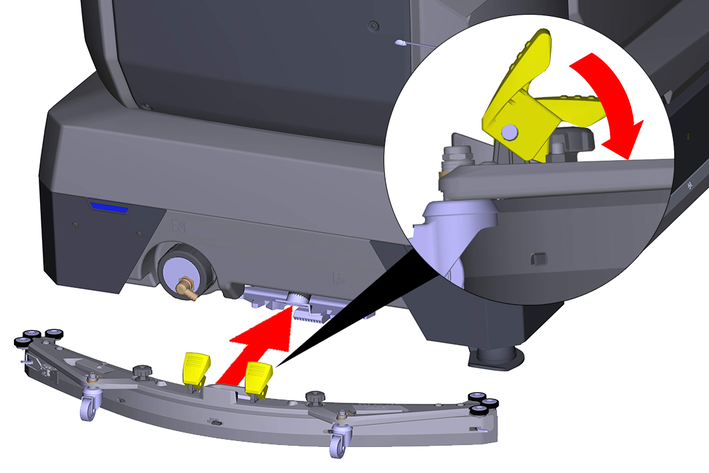
Push the suction bar completely in the suction bar mount.
Close the lock handles of the quick-release fasteners.
Raise the suction bar again using the service function.
The height of the suction bar is already preset at the factory. The height may need to be readjusted. Follow the instructions below.
The height adjustment affects the bending of the suction lips on contact with the floor.
Standard setting: 3 washers above, 3 washers below the suction bar.
Uneven ground: 5 washers above, 1 washer below the suction bar.
Very smooth ground: 1 washer above, 5 washers below the suction bar.
Unscrew the nuts.
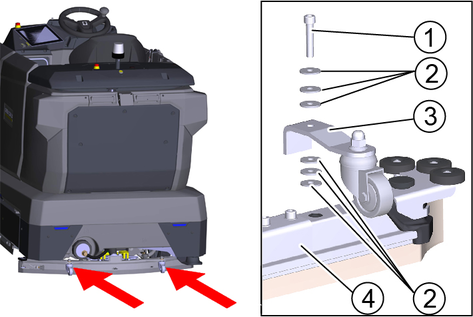
Place the desired number of washers between the suction bar and the spacer roller.
Fit the remaining washers above the spacer roller.
Screw on the nut and tighten.
Repeat the entire procedure at the other spacer roller.
Set both spacer rollers to the same height.
Danger of accident
A damaged or defective device can lead to accidents during operation.
Check the device before use and report any damage or malfunctions to the person responsible.Do not use the device if it is damaged or malfunctions.Check the device for leaks.
Check the function of the emergency stop button.
Check the function of the safety door.
Danger of accident due to defective safety button on the safety door
Take the device out of operation immediately if the safety button on the safety door does not function reliably.Check the accelerator pedal (does the device stop reliably when the accelerator pedal is released?)
Check the sensors for soiling, clean if necessary.
Restart the device.
Check the function of the sensors (does the device detect obstacles?).
Press the start button.
The device starts up.
Wait until the log-in screen is displayed on the touch screen.
The executable functions are displayed in the main menu.
Please refer to the separate software instructions for further operation and application instructions. You can find these on the details page of the device and in the software.
The operating instructions enclosed with the device only cover the activities for startup and a troubleshooting guide in case of a defective touch screen.
The full operating instructions and explanatory video clips can be accessed and viewed on the touchscreen after the Initial startup of the device.
Follow the instructions in the software manual for the device.
All settings and cleaning parameters are described in the separate software instructions. Please observe these instructions when using the device.
Press the Settings button in the main menu.
The Settings menu is displayed. Important basic functions:
Creating and managing users
Setting the time and the date
Configuring the network connection
System information (operating hours, software version, material number, serial number, updates)
For the reliable and safe execution of autonomous operation, the following rules must be observed.
Limit the cleaning area with barriers at the following points:
Steps
Stairs
Escalators, moving walkways
Lifting platforms
Do not place ladders, scaffolding or other temporary obstacles in the cleaning area.
Do not leave electric cables or other low obstacles (up to 15 cm high) in the cleaning area.
Routes for autonomous operation must not pass through lifts or automatically opening doors. Use lifts and automatic doors only in manual operation.
Keep a sufficient distance away from water basins and glass surfaces.
Avoid direct, strong light incidence (e.g. low sun) on the sensors.
Avoid crossing strong light/shadow boundaries.
In autonomous routes, do not approach roller doors head-on but parallel to the door.
Mark the cleaning area with warning signs and provide notice of wet floors.
In autonomous mode, do not climb on the device.
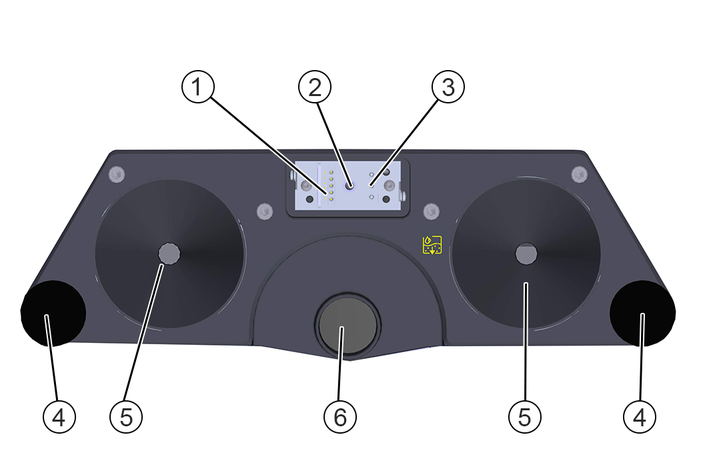
The device is supplied with an optional docking station. When choosing a location for the docking station, the following points should be taken into account:
Accessibility:
There should be sufficient space around the docking station (at least 4 m wide and 5 m in the direction of travel) so that the device can approach the docking station safely.
Access to electricity and water:
The location of the docking station should already have access to a power socket and fresh water as well as facilities for waste water disposal.
The drain opening must be close to the ground and have a gradient of 1° -3°. Otherwise, a lifting system is required for the waste water.
Not open to the public:
The docking station should be placed in a location that is not accessible to the public, as the KIRA B 200 must deactivate some of its safety functions in order to perform the docking manoeuvre.
The docking station is programmed in the device software. Please refer to the separate software instructions.
The device has a driver's workstation.
Open the safety door.
The safety door can remain open while driving.
Sit in the driver's seat (seat contact switch).
Adjust the driver's seat so that all control elements are within easy reach.
Select the direction of travel with the selector switch for the direction of travel.
Carefully press the accelerator pedal.
Release the accelerator pedal to brake.
The horn button is located next to the direction of travel switch.
After driving, park the device in a safe place and protect it from unauthorised access.
In manual mode, the device is driven by the operator over the surface to be cleaned.
Select the "Manual cleaning" menu item in the software and follow the instructions.
The parameters for fresh water and detergent added, as well as brush speed, contact pressure and suction are set in a submenu.
Open the safety door and take a seat on the driver's seat.
Drive the device to the operating location.
Select the desired settings for water quantity, detergent dosage, brush power and suction power.
Activate the required functions (suction, cleaning head).
Drive the device over the surface to be cleaned.
In manual mode, the device can be emptied via a docking station.
Select the "Docking" menu item in the software and follow the instructions.
Drive the device close to the docking station.
Start docking.
Risk of damage due to incorrectly approaching the docking station!
Manually starting up the docking station can damage the dock and / or the docking station.
The docking process may only be carried out automatically by the device's autonomous systems.In manual mode, the device can be emptied at a disposal point.
Drive the device to a suitable disposal point (floor drain, in accordance with the applicable regulations).
If necessary, connect the drain hose (located in the side device door) to the drain opening of the dock.
Start manual emptying using the service function on the display.
If necessary, the fresh water tank can be emptied manually.
Drive the device to a suitable disposal point (floor drain, in accordance with the applicable regulations).
Unscrew the cap of the fresh water tank (located at the back of the device).
Exercise caution when opening the fresh water tank. Depending on the filling level of the tank, contamination may occur due to water splashing out.
After emptying the tanks, tighten the cap again.
Inadvertently starting up device
Risk of injury, electric shock
Switch the device off before working on it.Unplug the mains plug or disconnect the device from the docking station .Drain and dispose of the waste water and fresh water.
Contact Customer Service in the case of malfunctions that cannot be corrected using this table.
The device is switched on, the device display remains dark or shows errors
Remedy:
Restart the device.
Contact KÄRCHER Service.
The device cannot be started
Remedy:
Check the emergency stop button on the top of the device.
Check the battery charge level and charge the device if necessary.
If necessary, the device can be moved manually. This can occur, for example, if the battery is completely discharged and the device can no longer start up the docking station. If the device cannot be charged via a socket, it must be pushed manually. To do this, the brake of the device must be released and the emergency steering activated.
Open the left protective cover (door) of the suction head.
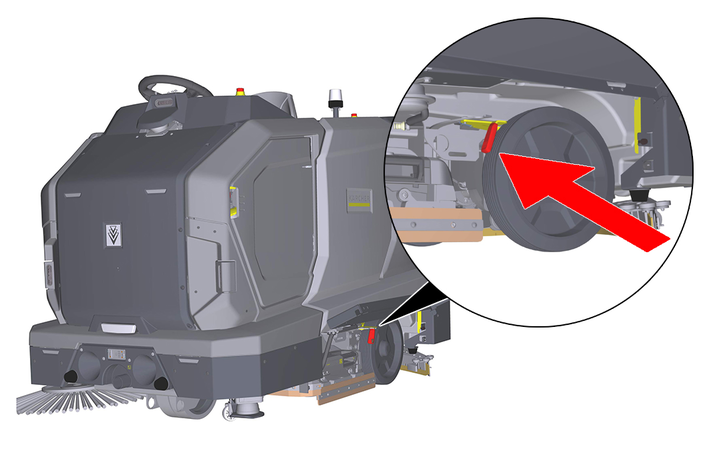
Pull the brake lever forwards
The brake is now released and the device can be pushed manually.
Risk of injury due to unexpected movement of the device.
If the brake is released, the device can move in an uncontrolled manner and cause serious injury and damage to property.
Only release the brake on level surfaces and pay attention to the weight of the device when pushing it. Do not push the device alone and pay attention to people and objects in the vicinity.After releasing the brake, the emergency steering must be activated to steer the device. The emergency steering functions by means of a separate battery even when the battery pack is completely discharged. The battery is located in the side compartment of the device and must always be present and charged.
Open the service bay.
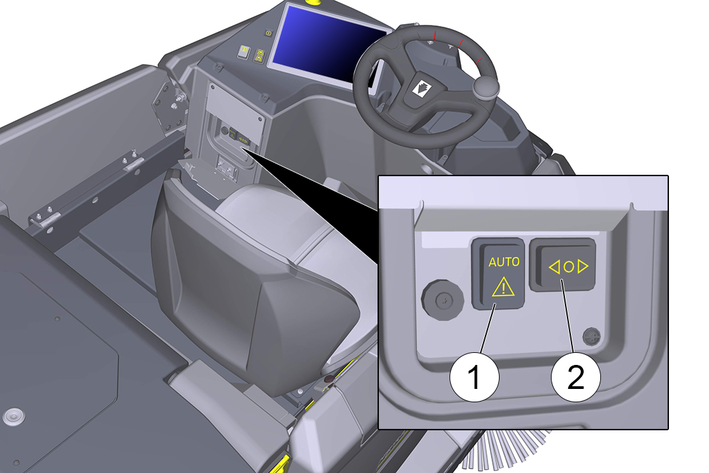
Activate the emergency steering function with the button.
Use the LEFT/RIGHT button to steer the front wheel.
To steer, stop pushing. Steer the front wheel in the desired direction and push it further.
After reaching the destination, return the brake lever to its original position (brake applied) and deactivate the emergency steering.
The warranty conditions issued by our relevant sales company apply in all countries. We shall remedy possible malfunctions on your appliance within the warranty period free of cost, provided that a material or manufacturing flaw is the cause. In a warranty case, please contact your dealer (with the purchase receipt) or the next authorised customer service site.
Further information can be found at: www.kaercher.com/dealersearch
Further warranty information (if available) can be found in the service area of your local Kärcher website under "Downloads".
Allgemein | |
Autonomous travel speed (max.) | 3.36 mph |
Manual travel speed manual (max.) | 3.73 mph |
Autonomous theoretical surface coverage | 52312.6 ft2/h |
Manual theoretical surface coverage | 58232.76 ft2/h |
Surface coverage per tank filling | 76886.61 (7143) sq ft (m2) |
Fresh/waste water tank volume | 43.99 gal |
Coarse dirt container volume | - gal |
Detergent tank volume (Option Dose) | 2.2 gal |
Detergent dosing | 0...3 % |
Water dosing | 0...1.32 gal/min |
Dimensions | |
Length | 76.54 inch |
Width without suction bar | 44.80 inch |
Width suction bar | 44.09 inch |
Height | 57.91 inch |
Working Width | 33.46 inch |
Working Width with side brushes | - inch |
Autonomous passage width (min.) | 53.15 inch |
Autonomous edge clearance (min.) | 5.91 inch |
Packaging dimensions lxwxh | 82.68*53.54*70.87 inch |
Tyres | |
Front wheel, width | 4.92 inch |
Front wheel, diameter | 9.84 inch |
Rear wheel, width | 2.76 inch |
Rear wheel, diameter | 13.78 inch |
Weight | |
Approved total weight | 1825.43 lbs |
Net weight (transport weight) | 1384.5 lbs |
Brush pressure, max. | 17422 lbf |
Brush contact pressure, max. | 2843.9 (29) N / m2 (g / cm2) |
Surface pressure | |
Steering roller | max 0.6 N/mm2 |
Rear wheel | max 0.8 N/mm2 |
Device performance data | |
Number of batteries | 4 |
Nominal voltage, Li-Ion | 25.6 V |
Battery capacity, Li-Ion | 320 Ah (5 h) |
Driving motor power | 2x 650 W |
Suction Turbine Power | 552 W |
Brush Drive Power | 1200 W |
Running time with full battery | 4 h |
Protection Class | IPX3 |
Suction | |
Suction Power, Airflow | 19...24 l/s |
Negative Pressure (max.) | 1.7...0.68 psi |
Cleaning Brushes | |
Brush length | - inch |
Brush rotation speed | 177 1/min |
Internal charger | |
Rated voltage | 100...240 V |
Current consumption | 10-.,4 A |
Power input | 1-2.25 kW |
Frequency | 50-60 Hz |
Power | 1.0 (100 V) kW |
Battery charging time | 11.9...4.7 h |
Environmental conditions | |
Permissible temperature range | 41...104 (5...40) °F (°C) |
Water temperature max. | 122 (50) °F (°C) |
Filling system water pressure | 145.04 psi |
Waste water tank flushing system water pressure | 145.04 psi |
Relative humidity | 20...90 % |
Incline | |
Max. working area slope | 6 auto / 15 manu % |
Incline short distance (max. 10 m) Transport, loading | 25 % |
Determined values according to EN 60335-2-72 | |
Hand-Arm Vibration value | 0.5 m/s2 |
Uncertainty K | 0.2 dB(A) |
Sound pressure level LpA | 64.5 dB(A) |
Uncertainty KpA | 2 dB(A) |
Sound power level LWA + Uncertainty KWA | 79.2 dB(A) |
Allgemein | |
Autonomous travel speed (max.) | 3.36 mph |
Manual travel speed manual (max.) | 3.73 mph |
Autonomous theoretical surface coverage | 49406.35 ft2/h |
Manual theoretical surface coverage | 55003.58 ft2/h |
Surface coverage per tank filling | 76886.61 (7143) sq ft (m2) |
Fresh/waste water tank volume | 43.99 gal |
Coarse dirt container volume | 1.98 gal |
Detergent tank volume (Option Dose) | 2.2 gal |
Detergent dosing | 0...3 % |
Water dosing | 0...1.32 gal/min |
Dimensions | |
Length | 76.54 inch |
Width without suction bar | 44.80 inch |
Width suction bar | 44.09 inch |
Height | 57.91 inch |
Working Width | 33.46 inch |
Working Width with side brushes | 39.37 inch |
Autonomous passage width (min.) | 53.15 inch |
Autonomous edge clearance (min.) | 5.91 inch |
Packaging dimensions lxwxh | 82.68*53.54*70.87 inch |
Tyres | |
Front wheel, width | 4.92 inch |
Front wheel, diameter | 9.84 inch |
Rear wheel, width | 2.76 inch |
Rear wheel, diameter | 13.78 inch |
Weight | |
Approved total weight | 1829.84 lbs |
Net weight (transport weight) | 1388.91 lbs |
Brush pressure, max. | 149.97 lbf |
Brush contact pressure, max. | 21084.3 (215) N / m2 (g / cm2) |
Surface pressure | |
Steering roller | max 0.6 N/mm2 |
Rear wheel | max 0.8 N/mm2 |
Device performance data | |
Number of batteries | 4 |
Nominal voltage, Li-Ion | 25,6 V |
Battery capacity, Li-Ion | 320 Ah (5 h) |
Driving motor power | 2x 650 W |
Suction Turbine Power | 552 W |
Brush Drive Power | 1500 W |
Running time with full battery | 4 h |
Protection Class | IPX3 |
Suction | |
Suction Power, Airflow | 19...24 l/s |
Negative Pressure (max.) | 1.7...0.68 psi |
Cleaning Brushes | |
Brush length | 31.5 inch |
Brush rotation speed | 380/670/950 1/min |
Internal charger | |
Rated voltage | 100...240 V |
Current consumption | 10-9.4 A |
Power input | 1-2.25 kW |
Frequency | 50-60 Hz |
Power | 1.0 (100 V) kW |
Battery charging time | 11.9...4.7 h |
Environmental conditions | |
Permissible temperature range | 41...104 (5...40) °F (°C) |
Water temperature max. | 122 (50) °F (°C) |
Filling system water pressure | 145.04 psi |
Waste water tank flushing system water pressure | 145.04 psi |
Relative humidity | 20...90 % |
Incline | |
Max. working area slope | 6 auto / 15 manu % |
Incline short distance (max. 10 m) Transport, loading | 25 % |
Determined values according to EN 60335-2-72 | |
Hand-Arm Vibration value | 0.5 m/s2 |
Uncertainty K | 0.2 dB(A) |
Sound pressure level LpA | 64.5 dB(A) |
Uncertainty KpA | 2 dB(A) |
Sound power level LWA + Uncertainty KWA | 79.2 dB(A) |