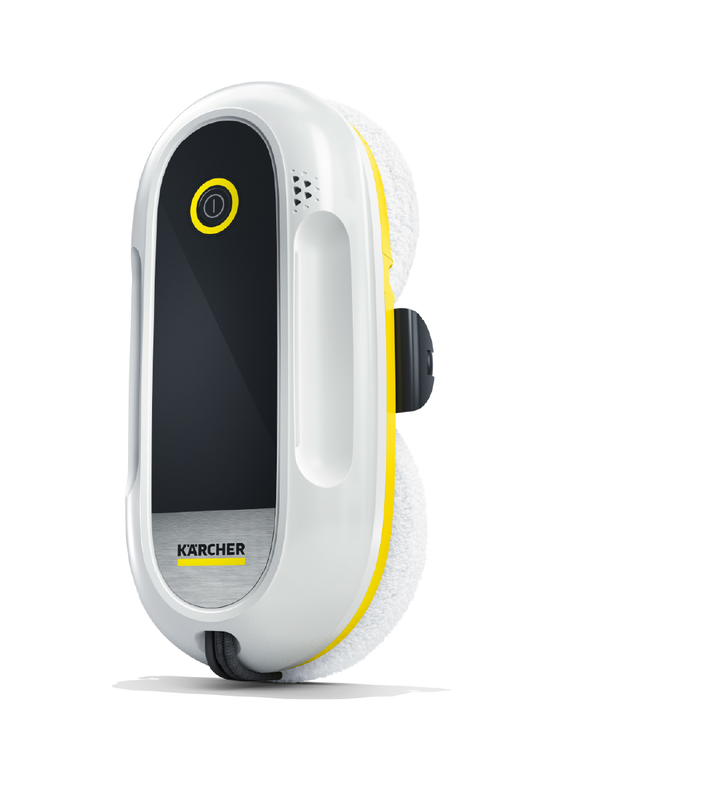
RCW 2
59805990 (09/25)
59805990 (09/25)
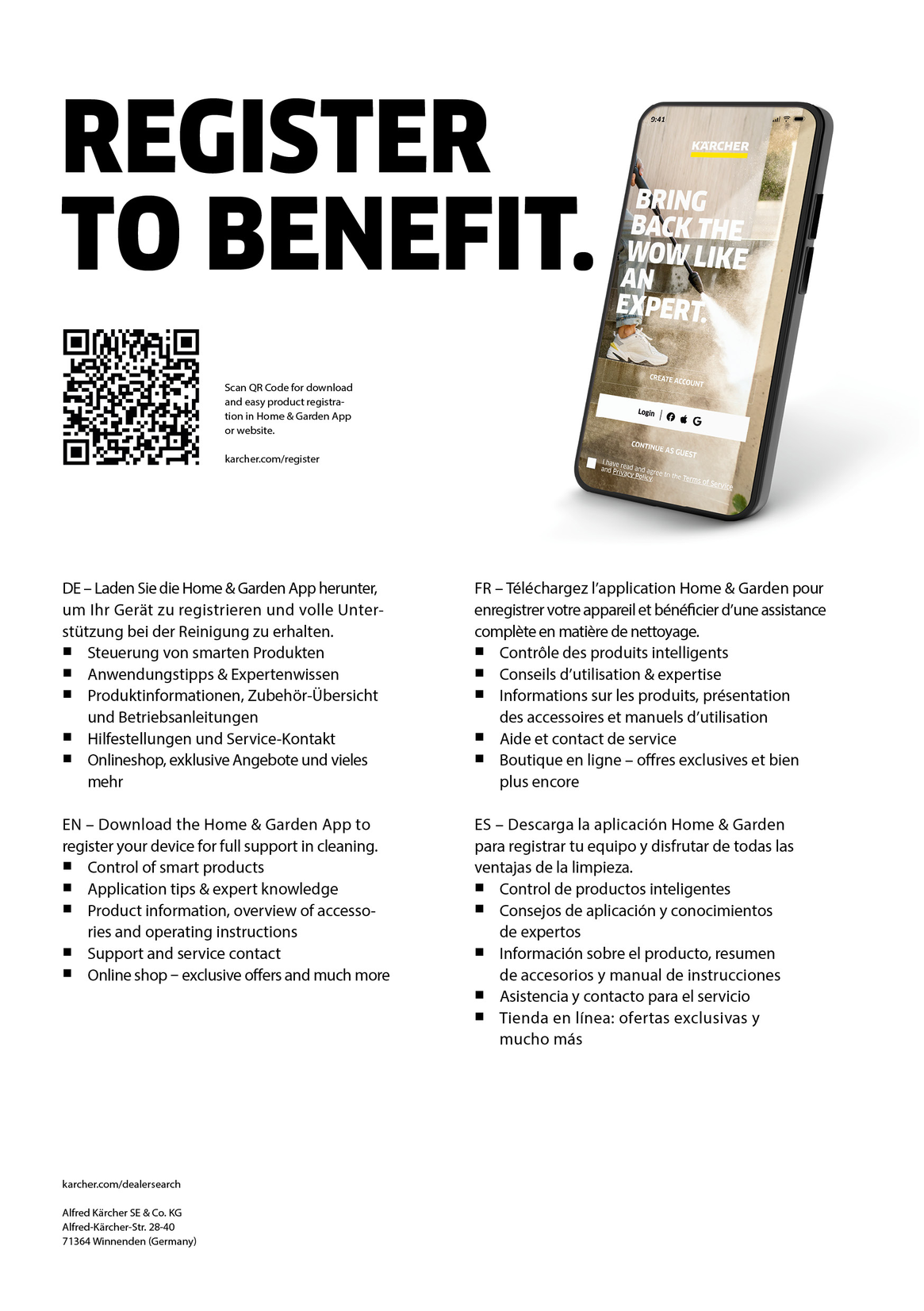
With the KÄRCHER Home & Garden app, you benefit from the following advantages when using your device:
Application tips & expert knowledge
Product information, overview of accessories and operating instructions
Support and service contact
Online shop - exclusive offers and much more
Scan the code on the packaging or download the KÄRCHER Home & Garden app from your app store and conveniently register your product.
Read the original instructions before using the device for the first time and act in accordance with it. Keep the original instructions for future reference or for future owners.
If the operating instructions and safety instructions are not observed, the device can be damaged and dangers could arise for users and other persons.
Notify the dealer immediately in the case of shipping damage.
Check the package contents when unpacking for missing accessories or for damage.
Read this safety chapter and these original instructions before using the device for the first time. Act in accordance with them. Keep the original instructions for future reference or for future owners.
In addition to the notes in the operating instructions, you also need to take into consideration the general safety regulations and accident prevention guidelines applicable by law.
Warnings and information notices attached to the device provide important information for hazard-free operation.
Indication of an imminent threat of danger that will lead to severe injuries or even death.
Indication of a potentially dangerous situation that may lead to severe injuries or even death.
Indication of a potentially dangerous situation that may lead to minor injuries.
Indication of a potentially dangerous situation that may lead to damage to property.
Never touch the mains plug and socket with wet hands.
Check the power supply cable and mains plug for damage each time before use. Have a damaged power supply cable/mains plug immediately replaced by authorized Customer Service personnel or a qualified electrician. Do not put the device into operation with a damaged power supply cable/mains plug.
Have repair work and work on electrical components carried out only by authorized Customer Service personnel.
Never touch contacts or lines.
Only use original Kärcher detergents and do not use the cleaning robot on wet glass surfaces, otherwise it could slip or fall.
Persons with reduced physical, sensory or mental capabilities and persons lacking experience and knowledge may only use the appliance if they are properly supervised, have been instructed on use of the appliance safely by a person responsible for their safety, and understand the resultant hazards involved.
Children must be supervised to prevent them from playing with the appliance.
Children from the minimum age of 8 may use the appliance if they are properly supervised or have been instructed in its use by a person responsible for their safety, and if they have understood the resultant hazards involved.
Children may only perform cleaning work and user maintenance under supervision.
Children must not play with the appliance.
The appliance contains electrical components - do not clean the appliance under running water.
Do not pull or carry the device by the mains cable. Do not use the mains cable as a carrying handle. Do not close a door over the mains cable and do not pull the mains cable around sharp edges or corners. Do not run the device over the mains cable. Keep the mains cable away from hot surfaces.
Switch off the device and unplug the mains plug before performing cleaning/maintenance.
Do not use the appliance if it has been dropped beforehand, is visibly damaged or if it is leaking.
Never leave the device unsupervised while it is in operation.
Do not use the device in swimming pools which contain water.
The cleaning robot is designed for cleaning vertical, framed glass surfaces with a maximum inclination of ±45°, as well as smooth, flat hard surfaces such as mirrors.
The device is suitable for regular maintenance cleaning, not for basic cleaning. Pre-cleaning is required for heavy soiling (e.g. bird droppings, heavy pollen, window paint).
Only use the device in private households.
 The packing materials can be recycled. Please dispose of packaging in accordance with the environmental regulations.
 Electrical and electronic devices contain valuable, recyclable materials and often components such as batteries, rechargeable batteries or oil, which - if handled or disposed of incorrectly - can pose a potential danger to human health and the environment. However, these components are required for the correct operation of the device. Devices marked by this symbol are not allowed to be disposed of together with the household rubbish.
Current information on content materials can be found at: www.kaercher.de/REACH
The scope of delivery for the appliance is shown on the packaging. Check the contents for completeness when unpacking. If any accessories are missing or in the event of any shipping damage, please notify your dealer.
Only use original accessories and original spare parts. They ensure that the appliance will run fault-free and safely.
Information on accessories and spare parts can be found at www.kaercher.com.
Risk of injury due to missing or modified safety devices!
Safety devices are provided for your own protection.
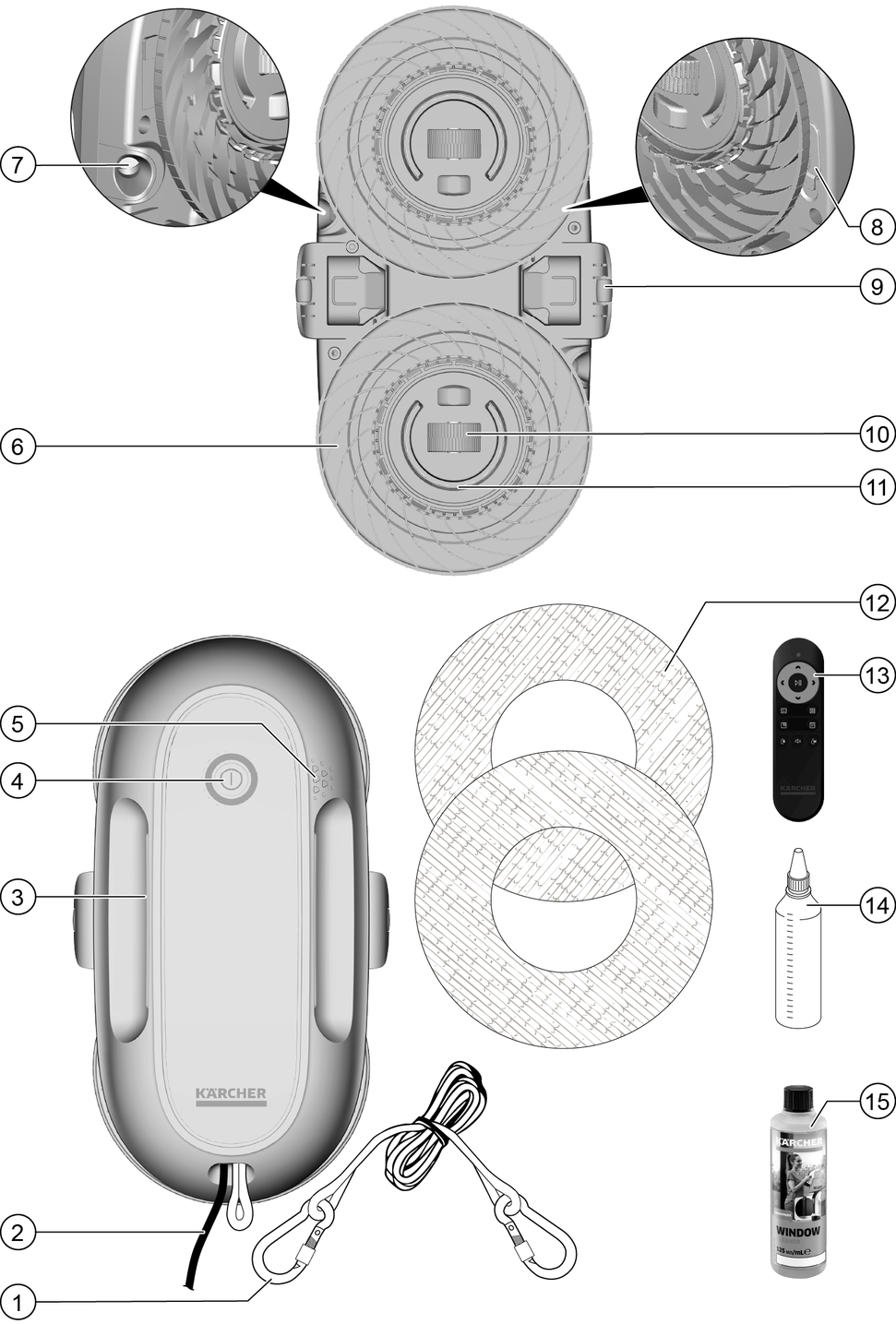
Do not bypass, remove or render ineffective any safety devices.The correctly fitted 4 m safety rope can prevent the cleaning robot from falling to the ground freely in case of a vacuum loss.
As the cleaning robot holds onto the glass surface with self-generated negative pressure, there is a risk of it crashing if the power supply is interrupted. When fully charged, the built-in emergency supply battery provides enough power for a period of at least 40 minutes to hold the cleaning robot in place on the glass surface by means of negative pressure.
These operating instructions describe the maximum possible equipment scope. Depending on the model, the scope of delivery and colour may differ (see packaging imprint).
The cleaning robot can also be controlled using the remote control.
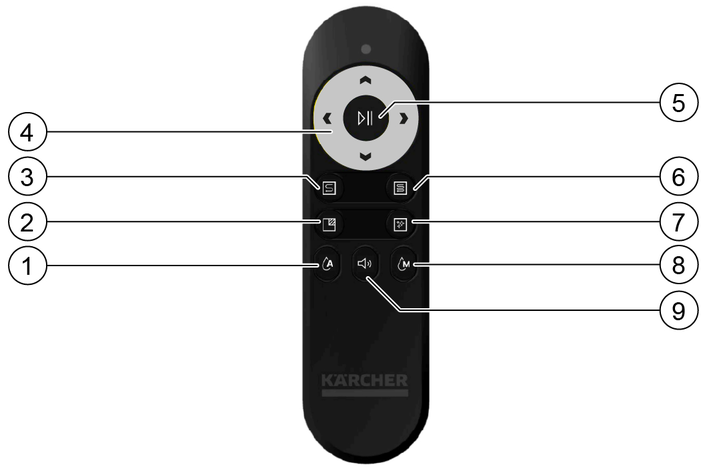
The function of the Start / Pause button depends on the situation in which the cleaning robot finds itself:
The cleaning robot is switched on and positioned on the window. Cleaning has not started.
Short button press: The quick clean starts.
Briefly pressing the On / Off button on the cleaning robot has the same function as the Start / Pause button on the remote control.
The cleaning robot is in automatic cleaning mode:
Short button press: The cleaning mode is paused.
Press the button again briefly: Cleaning mode continues.
Short button press: The voice output is deactivated.
Press the button again briefly: The voice output is activated.
Long button press (3 s): The language changes.
The device can be moved forwards, backwards, right and left manually using the arrow buttons.
Short button press: The cleaning robot moves in the desired direction until the Pause button is pressed or the window frame is reached.
Pressing an arrow button immediately cancels any automatic cleaning mode.
While the cleaning robot is being moved manually, the automatic water stream is deactivated.
Short button press: The selected cleaning mode is started.
If one of the buttons is pressed while a cleaning programme is running, the active programme is deleted and the newly selected programme is started from the beginning.
Short button press: The automatic spray function is deactivated.
Press the button again briefly: The automatic spray function is activated.
If the automatic water stream button is pressed, the automatic spray function remains deactivated until the button is pressed again or the cleaning robot is switched off and on again.
Short button press: The cleaning robot sprays a single water stream.
The remote control is powered by 2 AAA batteries.
Non-rechargeable batteries must not be recharged.
Different types of batteries or new and used batteries must not be mixed.
Insert the batteries with the correct polarity.
Used batteries must be removed from the remote control and disposed of safely.
If the device is stored unused for a long period of time, the batteries should be removed.
The supply terminals must not be short-circuited.
Open the battery compartment cover on the back of the remote control and remove or insert the AAA batteries.
The device consists of the cleaning robot and the remote control.
The remote control is used to control the device manually, select the cleaning mode and switch the voice output on or off.
The cleaning robot adheres to the glass surface to be cleaned via a self-generated vacuum and moves it down automatically.
2 ultrasonic spray nozzles atomise the cleaning solution into a mist and distribute it evenly over the glass surface.
Cleaning is carried out by 2 cleaning discs equipped with microfibre wipe covers. A wiping movement is generated by rotating the cleaning discs.
The device has various cleaning modes, see Cleaning modes.
In automatic mode, the cleaning robot travels along the glass surface in overlapping paths and stops automatically when cleaning is complete.
The cleaning navigation system ensures that the glass surface is evenly travelled over and cleaned thanks to systematic route planning.
The position memory function ensures that the device automatically returns to the starting point for easy removal from the glass surface after cleaning.
In manual cleaning mode, the cleaning robot is controlled using the arrow buttons.
For operation, KÄRCHER microfibre wipe covers and KÄRCHER window cleaning solution RM 503 are required.
The device has various cleaning modes.
Quick cleaning (automatic mode):Single pass over the glass surface in horizontal movements.
Intensive cleaning (automatic mode):The glass surface is passed over twice in horizontal movements, followed by edge cleaning and polishing.
Spot cleaning (automatic mode):Back and forth movements on a small surface.
Polishing (automatic mode):Single pass over the glass surface in horizontal movements without spraying detergents.
Manual cleaning:Manual driving using the arrow buttons on the remote control.
The cleaning robot indicates various operating states and errors with voice output, light and signal tones.
LED | Sound / Voice output | Meaning | |
|---|---|---|---|
Start / Stop | Yellow | Signal tone | Press the On / Off button on the cleaning robot to start the cleaning robot. |
Place the robot on the window. | A notification appears one minute after the cleaning robot has started if the robot has not been attached to the glass surface. | ||
Signal tone | Press the On / Off button on the cleaning robot to switch the cleaning robot off. | ||
- | To release the device, hold it firmly and press the off switch. | 1 minute after the end of cleaning, provided the cleaning robot has not been removed from the glass surface. | |
Operation | Blue | Quick cleaning is started. | Press the button for quick cleaning mode on the remote control. |
Intensive cleaning is started. | Press the button for intensive cleaning on the remote control. | ||
Spot cleaning is started. | Press the button for spot cleaning on the remote control. | ||
Polishing is started. | Press the button for polishing on the remote control. | ||
The cleaning continues. | Press the start button on the remote control. | ||
Automatic water dispensing switched on. | Press the button for automatic water dispensing on the remote control. | ||
Signal tone | Press the button for manual spray jet on the remote control. | ||
blue, fading | Cleaning stopped. | Press the pause button on the remote control. | |
- | Cleaning completed. | Cleaning finished. | |
Settings | Yellow | Voice output on. | Press the button for voice output on the remote control. |
Voice output off. | Press the button for voice output on the remote control. | ||
- | Language selection | Press the button for voice output on the remote control for longer than 3 seconds. | |
Warning / Error | blue, flashes | Please fill the water tank. | Tank empty. |
orange, flashes | Please connect the power cable. | Mains cable not connected or power supply interrupted. | |
red, flashing | The charge level of the emergency supply battery is low. Please do not disconnect the device from the power supply until the battery is fully charged. | Emergency supply battery discharged /charging. | |
red, flashing | Error message | Error occurred in the device. For remedy, see chapter Troubleshooting guide. | |
Green | - | Emergency supply battery is charged. | |
green, flashing | - | Emergency supply battery is being charged. |
For optimal cleaning results and safe driving characteristics, only use KÄRCHER window detergent RM 503. If other detergents are used (e.g. alcohol), it can lead to functional impairments.
Mix the cleaning solution. To do this, pour the detergent concentrate into the filling bottle and dilute with water according to the instructions on the label.
Fill the tank.
To maintain a stable air pressure, do not overfill the tank.
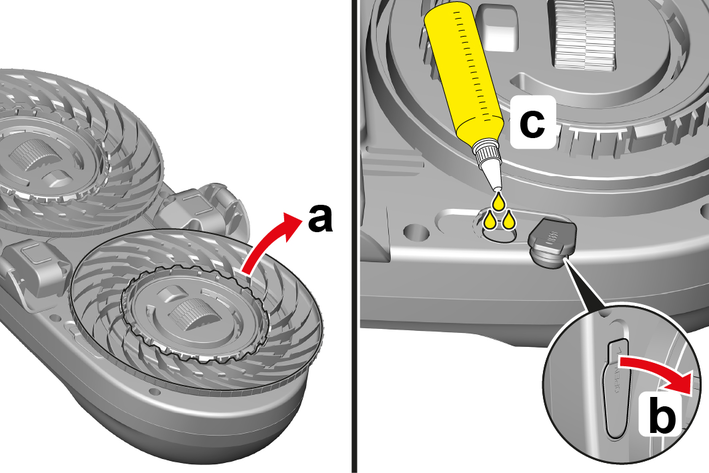
Detach the upper cleaning disc from the cleaning robot by pulling it carefully.
Open the tank cap.
Risk of damage due to liquid intrusion
Cleaning fluid entering the ventilation openings can cause damage to the robot.
When filling, make sure that no cleaning fluid runs into the ventilation openings.Fill the tank to max. 80% using the filler bottle.
Close the tank cap and press it on.
Press the cleaning disc into position until you hear a click.
Remove the cleaning discs from the cleaning robot by pulling them carefully.
Pull the wipe covers over the cleaning disc.
To put the wipe cover over the cleaning disc, stretch the elastic band on the side with the yellow seam.
Pull on the wipe cover so that the yellow side is facing the cleaning robot and the white side is facing the glass surface.
Pull the wipe cover into shape so that it lies evenly and flat on the cleaning disc.
Attach the cleaning discs to the cleaning robot by applying light pressure until you hear a click and the cleaning robot and cleaning discs are firmly connected.
Do not use the cleaning robot if the window seals are damaged.
Remove any objects that protrude into the movement area of the cleaning robot and could hinder its movements.
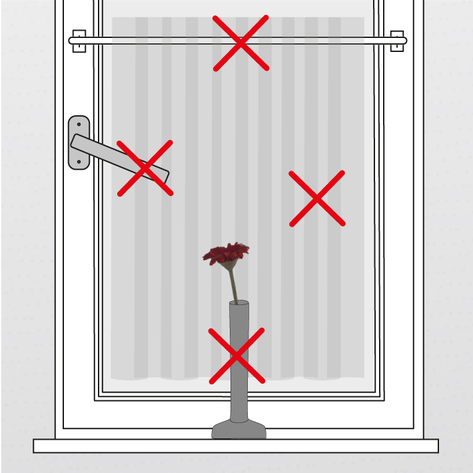
Obstacles can be,e.g.:
Curtains and drapes
Objects on windowsills
Window handles
Window pictures and stickers
Fasteners attached to the glass surface or adjacent framee.g. such as suction cups or hooks for net curtain rods etc.
Check the glass surface for heavy soiling, such asdried bird droppings or thick pollen buildup.
Pre-clean heavily soiled glass surfaces.
Allow the pre-cleaned surfaces to dry completely before attaching the cleaning robot.
Ensure that the movement space of the cleaning robot is not restricted during operation.
The movement space can be limited by, e.g.:
Shutters and blinds lowered accidentally or automatically
Adjacent hinged or sliding doors and windows opening or closing accidentally or automatically
Windows, doors, curtains and drapes, etc., moving accidentally or as a result of drafts
Check the safety rope and carabiner hooks for damage and contamination before each use.
Replace damaged parts immediately.
Clean dirty parts.
Check the safety rope for knots and twists; remove them if present.
Attach the safety rope:
Attach the safety rope so that it cannot get into the movement area of the cleaning robot. If the robot runs over the strap, it could detach from the glass surface and fall down.
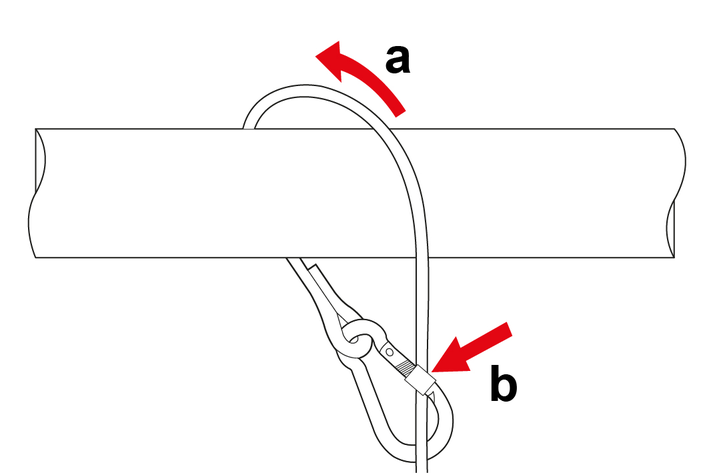
Loop the safety line around a suitable, stable point,e.g. a window handle, curtain rod, table leg, wall or ceiling hook.
Attach the second carabiner hook to the loop on the cleaning robot and tighten the knurled nut.
Always tighten the lock nut, otherwise the snap hook can come loose from the cleaning robot during various movements.
If no suitable fixing point is available, the safety rope can also be clamped in the window. To do this, open the window, clamp the safety rope at the top and bottom and close the window firmly.
Make sure that there is always enough safety rope so that the cleaning robot can cross the entire window.
Caught in the safety rope or mains cable
Strangulation by safety rope or mains cable
Keep children and pets away from the safety rope and mains cable.Risk of injury due to the cleaning robot falling.
The cleaning robot can detach from the window pane and fall down in the event of a malfunction or an accident, e.g.heavy rain or wind.
Operate the cleaning robot only with the supplied, functioning, undamaged and correctly installed safety rope.Always keep a sufficiently large area under the cleaning robot free of people and pets while it is attached to a glass surface.Always maintain visual and acoustic contact with the cleaning robot while it is in operation, in order to keep the hazard zone free and be able to remove it from the glass surface if necessary.Remove the cleaning robot from the glass surface when a malfunction is visible or indicated by sound signals, and in the event of strong wind or precipitation when in use outdoors.Risk of injury due to rotating cleaning discs.
There is a risk of injury due to body parts being crushed on the cleaning discs.
Keep body parts such as fingers and hair as well as loose clothing such as ties and scarves away from the cleaning discs.Preparing the cleaning robot:
Fill the detergent tank.
Attach the microfibre wipe covers.
Attach the safety rope.
Fit the power cable.
Insert the mains plug into a mains socket.
Position the cleaning robot vertically on the glass surface and hold the on / off button until the motor starts and the robot adheres firmly to the pane.
Place the cleaning robot at mid-height on the glass surface, maintaining a distance from the frame.
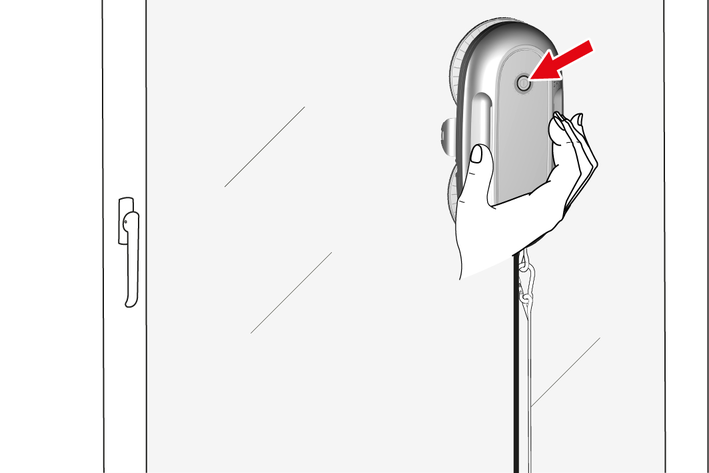
Start the quick cleaning programme by briefly pressing the on / off button or use the remote control to select the desired cleaning programme.
Cleaning starts.
We recommend observing the cleaning robot the first time it is used on a new surface to check whether it recognises the edges and frames correctly or whether there are any obstructions.
Briefly press the Start / Pause button on the remote control or the On / Off button on the device.
The robot can be manually navigated to the desired position using the arrow buttons on the remote control.
At the end of an automatic cleaning programme, the cleaning robot stops at its original position.
Remove the cleaning robot from the glass surface:
Hold the cleaning robot by the handle and press the On / Off button 2 - for 3 seconds.
Wait until the motor noise stops and the vacuum has been released.
Remove the cleaning robot from the glass surface.
Transfer the cleaning robot to another glass surface:
Clean the underside of the cleaning robot, especially the sensors, spray nozzles and drive wheels.
If necessary, remove the safety rope and attach it to a new position.
Start the cleaning.
Finishing the cleaning:
Pull out the mains plug.
Remove the safety line.
Release the cleaning discs from the cleaning robot by pulling gently and remove the wipe covers.
Drain the detergent tank.
Risk of damage due to liquid intrusion
Cleaning fluid entering the ventilation openings can cause damage to the robot.
Make sure that no cleaning fluid runs into the ventilation openings.Clean the cleaning robot, see Cleaning the cleaning robot.
Risk of injury due to rotating cleaning discs.
There is a risk of injury due to body parts being crushed on the cleaning discs.
Keep body parts such as fingers and hair as well as loose clothing such as ties and scarves away from the cleaning discs.Remove the microfibre wipe covers and wash them out or wash them in the washing machine at up to 40 °C without fabric softener.
The microfibre wipe covers can be used on both sides.
Clean the drive wheels, sensors, spray nozzles and cleaning discs with a damp cloth.
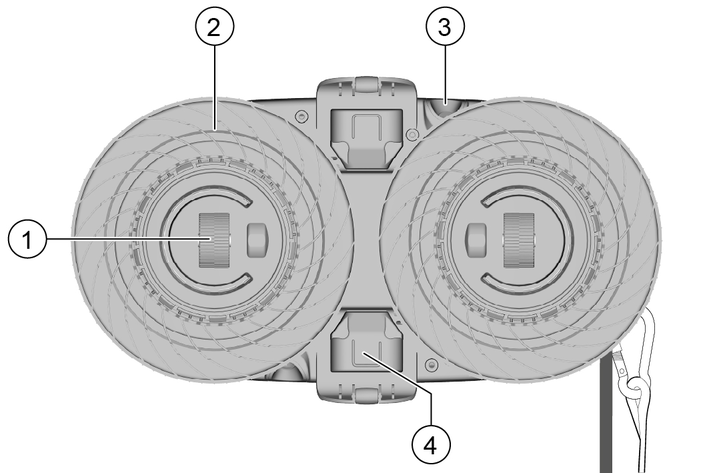
To clean the drive wheels, plug in the power cable, but do not switch on the cleaning robot! To make the wheels turn, press the arrow button
Risk of damage due to liquid intrusion
Liquid entering the ventilation openings can cause damage to the robot.
Do not hold the cleaning robot under running water.If necessary, clean the casing of the cleaning robot with a damp cloth.
Failure to observe the weight
Risk of injury and damage
Be aware of the weight of the device during transport and storage.Only store the device indoors.
You can remedy minor faults using the following overview.
If in any doubt, please contact your authorised Customer Service.
Danger of electric shock. Always switch off the device and pull out the mains plug before all care and maintenance work.
Repair work and work on electrical components must only be performed by your authorised Customer Service.You can remedy minor faults using the following overview.If in any doubt, please contact your authorised Customer Service.Cleaning robot does not stick to glass surface / error message: Insufficient vacuum
Cause:
Vacuum loss
Remedy:
Check that the microfibre wipe covers are undamaged and correctly fitted.
Check that the cleaning discs are undamaged and correctly fitted.
Do not use the cleaning robot on wet, oily or greasy glass surfaces. Only use the robot on framed, vertical (+/- 45°) and flat glass surfaces. Edges, gaps and uneven areas can lead to vacuum loss.
Cause:
The turbine does not work properly.
Remedy:
Contact Kärcher Service.
Cleaning robot slips during application
Cause:
Vacuum not sufficient.
Remedy:
Check that the microfibre wipe covers are undamaged and correctly fitted.
Check that the cleaning discs are undamaged and correctly fitted.
Do not use the cleaning robot on wet, oily or greasy glass surfaces. Only use the robot on framed, vertical (± 45°) and flat glass surfaces. Edges, gaps and uneven areas can lead to vacuum loss.
Cause:
The microfibre wipe covers are too wet or too dirty.
Remedy:
Replace the microfibre wipe covers.
Cause:
The drive wheels are wet or dirty.
Remedy:
Remove the cleaning robot from the glass surface, clean and dry the drive wheels.
Cause:
The turbine does not work properly.
Remedy:
Contact Kärcher Service.
The cleaning robot stops beyond reach
Cause:
Fault in the cleaning robot.
Remedy:
Use the remote control to manually bring the cleaning robot within reach and remove it from the glass surface.
The cleaning robot stops
Cause:
The power cable is disconnected / power failure. The cleaning robot holds onto the glass surface with the aid of the emergency supply battery.
Remedy:
Check the mains cable and the mains plug.
In the event of a power failure, remove the robot from the glass surface.
Check whether the length of the mains cable and the safety rope is sufficient for the size of the glass surface.
Cause:
Edge sensors are blocked.
Remedy:
Remove the cleaning robot from the glass surface.
Check the sensors for obstructions and clean.
Cause:
The window is too small.
Remedy:
Check whether the minimum window size of 35x35 cm is reached.
The cleaning robot does not spray water
Cause:
Automatic water dispensing is deactivated.
Remedy:
Activate automatic water dispensing with the remote control or spray water manually.
Cause:
The water reservoir is empty.
Remedy:
Fill the water reservoir.
Cause:
Air bubbles in the water reservoir.
Remedy:
Move and turn the cleaning robot.
Place the cleaning robot on the glass surface and start cleaning.
Cause:
The spray nozzle is blocked.
Remedy:
Clean the spray nozzle and test the spray function manually using the remote control.
Apply a drop of descaling liquid to the spray nozzle, leave to act briefly, clean the spray nozzle and test the spray function manually using the remote control.
Cleaning performance is not satisfactory
Cause:
The microfibre wipe covers are dirty.
Remedy:
Remove coarse dirt from the window before use.
Select intensive cleaning mode on the remote control.
Change the microfibre wipe covers after each window (can be used on both sides).
Repeat cleaning with clean microfibre wipe covers.
Clean the windows regularly.
Cause:
Microfibre wipe covers lose lint on the glass.
Remedy:
To remove the lint, wash the microfibre wipe covers in the washing machine at up to 40 °C.
Cause:
The microfibre wipe covers are too dry.
Remedy:
Spray manually several times until the microfibre wipe covers are moistened. Make sure that the microfibre wipe covers do not get too wet to prevent the robot from slipping on the glass surface.
Edge sensor error
Cause:
Fault in the cleaning robot.
Remedy:
Remove the cleaning robot from the glass surface.
Remove any obstructions from the sensor and clean it.
Check whether parts of the sensor are broken or damaged.
Drive error
Cause:
Fault in the cleaning robot.
Remedy:
Remove the cleaning robot from the glass surface.
Check whether the wheels are locked.
Clean and dry the wheels.
Check whether the wheels are broken or damaged.
Gyroscope error
Cause:
Fault in the cleaning robot.
Remedy:
Switch off the robot.
Disconnect the mains cable.
Wait 1 minute.
Switch on the robot.
If the error persists, contact Kärcher Service.
Battery fault
Cause:
Fault in the cleaning robot.
Remedy:
Connect the robot to the mains cable.
Wait 1 hour until the emergency supply battery is charged.
Switch on the robot.
If the error persists, contact Kärcher Service.
The warranty conditions issued by our relevant sales company apply in all countries. We shall remedy possible malfunctions on your appliance within the warranty period free of cost, provided that a material or manufacturing flaw is the cause. In a warranty case, please contact your dealer (with the purchase receipt) or the next authorised customer service site.
Further information can be found at: www.kaercher.com/dealersearch
Further warranty information (if available) can be found in the service area of your local Kärcher website under "Downloads".
Device | Type | Frequency band, MHz | Power, max. EIRP, mW |
|---|---|---|---|
RCW2 | Radio module SRD | 2400-2483,5 | 63096 |
Alfred Kärcher GmbH & Co. KG hereby declares that the radio device type Window Robo Cleaner complies with the 2014/53/EU directive. The full text of the EU Declaration of Conformity can be found at www.kaercher.com/int/robot-vacuums-and-mopsconformity.html.
Dimensions and weights | |
Weight without mains cable | 1,1 kg |
Electrical connection | |
Protection class | II  |
Frequency | 50 / 60 Hz |
Voltage | 220 V |
Device performance data | |
Operating pressure | 3300 Pa |
Operating pressure max. | 5000 Pa |
Emergency supply battery runtime | 40 min |
Safety rope length | 4 m |
Cleaning speed | 3 min/m² |
Minimum window size | 35 x 35 cm |
Minimum thickness of glass pane | 2 cm |
Filling quantity | |
Filling quantity of detergent tank in cleaning robot | 70 ml |
Environmental conditions | |
Ambient temperature | 5 - 40 °C |
Relative humidity | 20 - 60 % |
Determined values in acc. with EN 60335-2-54 | |
Sound level LpA at a distance of 1 m in standard cleaning mode | <70 dB(A) |