WV 2 Universal
59806670 (04/26)
59806670 (04/26)
Observe all basic precautions when using the device, including the following:
READ ALL INSTRUCTIONS BEFORE USING THIS MACHINE
For home use only!
Read all safety warnings and instructions.
Failure to follow the warnings and instructions may result in electric shock, fire and/or serious injury.
To reduce the risk of fire, electric shock, or injury:
Disconnect the charger from the mains socket if not in use and before performing maintenance work on the device or charger.
To reduce the risk of electric shock:
Do not expose to rain. Store indoors.
Do not allow to be used as a toy. Close attention is necessary when used by or near children.
Use only as described in this manual. Use only manufacturer’s recommended attachments.
Do not use with damaged battery charger output cord or plug. If appliance is not working as it should, has been dropped, damaged, left outdoors, or dropped into water, contact customer service.
Do not pull or carry by the battery charger output cord, do not use battery charger output cord as a handle, do not close a door on the battery charger output cord, or pull battery charger output cord around sharp edges or corners. Do not run appliance over battery charger output cord. Keep battery charger output cord away from heated surfaces.
Prevent unintentional starting. Ensure the switch is in off‑position before picking up or carrying the appliance. Carrying the appliance with your fingers on the switch or energizing appliance that have the switch on invites accidents.
Have servicing performed by a qualified repair person using only identical replacement parts. This will ensure that the safety of the product is maintained.
Unless otherwise stated in the instructions for use and care, do not modify or repair the device or the battery.
Do not unplug by pulling battery charger output cord. To unplug, grasp plug.
Do not handle battery charger or appliance with wet hands.
Do not put any objects into openings. Do not use if openings are blocked; keep free of dust, lint, hair, and anything that may reduce air flow.
Keep hair, loose clothing, fingers, and all parts of the body away from openings and moving parts.
Use extra care when cleaning on stairs.
Do not use to pick up flammable or combustible liquids, such as gasoline, or use in areas where they may be present.
Do not charge the unit outdoors.
Do not incinerate the device, even if it is severely damaged. The battery could catch fire and explode.
Do not use to pick up toxic material (chlorine bleach, amonia, drain cleaner, etc).
Do not pick up anything that is burning or smoking such as cigarettes, matches, or hot ashes.
Do not immerse. Use only on surfaces moistened by the cleaning process.
Risk of short circuit Do not insert any conductive objects (such as screwdrivers or similar) into the charger’s plug or socket, or the plugs of the charging cable.
In case of visual damage, replace the charger with original manufacturer suggested parts.
If misused, liquid can leak out of the battery. The escaping liquid can cause skin irritation or burns. Do not touch this. If you accidentally touch it, rinse the affected area with water. If the liquid comes into contact with the eyes, seek medical help.
Do not use a damaged or modified battery or a damaged or modified device. Unpredictable processes can occur in damaged or modified batteries, which can lead to fire, explosions or injuries.
Use a USB-C charger with an output of 5.0 V DC and 1.5 A, 7.5 W to recharge the device. When using a charger designed for a specific type of battery, there is a risk of fire if this is used with a different battery.
Follow all charging instructions and only charge the battery or device within the temperature range specified in the instructions. Incorrect charging or charging outside the specified temperature range can damage the battery and increase the risk of fire.
The voltage indicated on the type plate must correspond to the supply voltage.
Do not expose a battery or device to flames or excessive temperatures. Contact with flames or a temperature above 266 °F (130 °C) can lead to explosions.
Only store the charger in dry rooms at an ambient temperature of 41-104 °F (5-40 °C) and only use it under these conditions.
Only store the device in dry rooms at an ambient temperature of 41-104 °F (5-40 °C) and only use it under these conditions.
Never touch the mains plug with wet hands.
The battery has been tested in accordance with the relevant regulations for international transport and can be transported / delivered.
Use only with a Listed/Certified ICT or ITE Power Supply, or a Class 2 Power Unit.
Do not use the device on very warm / cold or hot / frozen surfaces.
SAVE THESE INSTRUCTIONS
Indication of an imminent threat of danger that will lead to severe injuries or even death.
Indication of a potentially dangerous situation that may lead to severe injuries or even death.
Indication of a potentially dangerous situation that may lead to minor injuries.
Indication of a potentially dangerous situation that may lead to damage to property.
 | Charge the battery with a USB-C charger. When charging for the first time and if no original KÄRCHER charger is used, the specified charging time may vary. |
 | Only use the charger in dry rooms. |
Never touch the mains plug or outlet when your hands are wet.
Never touch contacts or lines.
Never plug conductive objects, e.g. a screwdriver or similar into the charging socket of the device.
Batteries can be swallowed by children or persons with reduced physical, sensory or mental capabilities due to lack of experience or knowledge. Keep batteries out of the reach of children and these persons. Swallowing a battery is an emergency that requires immediate medical treatment.
Do not expose the device and battery to strong sunlight, heat or fire.
Danger of explosion. Do not charge non-rechargeable batteries.
Immediately replace a damaged charger or a charging cable with original parts.
Do not charge any damaged batteries. Replace damaged or degraded batteries with batteries approved by KÄRCHER.
Only use the charger to charge approved batteries.
Short-circuiting the battery terminals (+/-) can lead to an explosion and ignition. Do not short-circuit the terminals (+/–) on the battery or the device. Do not store batteries in metal containers or with other metal parts.
Batteries contain hazardous substances that can cause serious environmental damage. Do not dispose of batteries with household waste, but properly at a collection point or recycling center.
Fully charge the battery before using the device for the first time.
Use and store the charger indoors only.
Remove used or defective batteries from the device and dispose of them according to local regulations.
The battery compartment of the device is technically secured against accidental opening. Open and close the battery compartment as described in the operating instructions for the device.
When installing batteries, ensure the correct polarity (+/-) according to the markings in the battery compartment or on the electrical plug connections.
Only use the appliance in private households. The battery-powered appliance is designed for cleaning moist, smooth surfaces such as windows, mirrors or tiles. Observe the safety instructions.
Never use the device for vacuuming dust, objects or animals.
Do not absorb any more than 1.4 oz (40 ml) of fluid. The appliance is not suitable for absorbing larger quantities of fluid from horizontal surfaces, e.g.from a toppled drinking glass.
Only use the device with standard glass and window cleaning agents (do not use alcohol-based or foam detergents).
You can achieve optimum results with the products offered by KÄRCHER.
Only use the appliance with accessories and spare parts approved by KÄRCHER.
All uses other than this shall be regarded as not being in accordance with its intended use. The manufacturer is not responsible for any resultant damage; The risk for this is borne by the user alone.
The owner and/or user must have an understanding of the manufacturer’s operating instructions and warnings before using this device.
Warning information should be emphasized and understood.
If the operator is not fluent in English, the manufacturer’s instructions and warnings shall be read to and discussed with the operator in the operator’s native language by the purchaser/owner, making sure that the operator comprehends its contents. Owner and/or user must study and maintain for future reference the manufacturer’s instructions.
Your device must be registered in order to help with any questions or issues that you have. You can register your device at www.karcher-register.com if located in the U.S.A., www.karcher.com/ca if located in Canada, or www.karcher.com/mx if located in Mexico.
In the case of a warranty claim, you can contact customer support. Please see the contact information listed below for either the USA, Canada or Mexico. You MUST provide your proof of purchase in order to file a warranty claim either via e-mail, phone or fax.
You can contact our Customer Service department by phone at 1-800-537-4129 or via the website at www.karcher-help.com.
You can contact our Customer Service department by phone at 1-800-465-4980 or via the website at www.karcher.com/ca/support.
You can contact our Customer Service department by phone at 01-800-024-1313 or via the website at www.karcher.com/mx.
The scope of delivery for the appliance is shown on the packaging. During unpacking, check the contents for completeness. If any accessories are missing or in the event of any shipping damage, please notify our Customer Service department as stated above either by phone or via the website.
Only use original accessories and original spare parts. They ensure that the appliance will run fault-free and safely.
Information on accessories and spare parts can be found at www.kaercher.com.
Description | Order number, spare part |
|---|---|
Battery | 4.633-414.3 |
Electrical connection | |
Battery type | Li-Ion |
Nominal voltage of battery | 3.6 V |
Nominal voltage of charger | 5 V |
Nominal current of charger | 1 A |
Charging time for an empty battery | 170 Minutes |
Protection class | IPX4 |
Dimensions and weights | |
Weight | 1.3 (0.6) lbs (kg) |
Waste water tank volume | 4.06 (120) oz (ml) |
Device performance data | |
Nominal power | 10 W |
Battery capacity | 7.2 Wh |
Operating duration with a fully charged battery | 35 Minutes |
Part number | 1.633-723.0 |
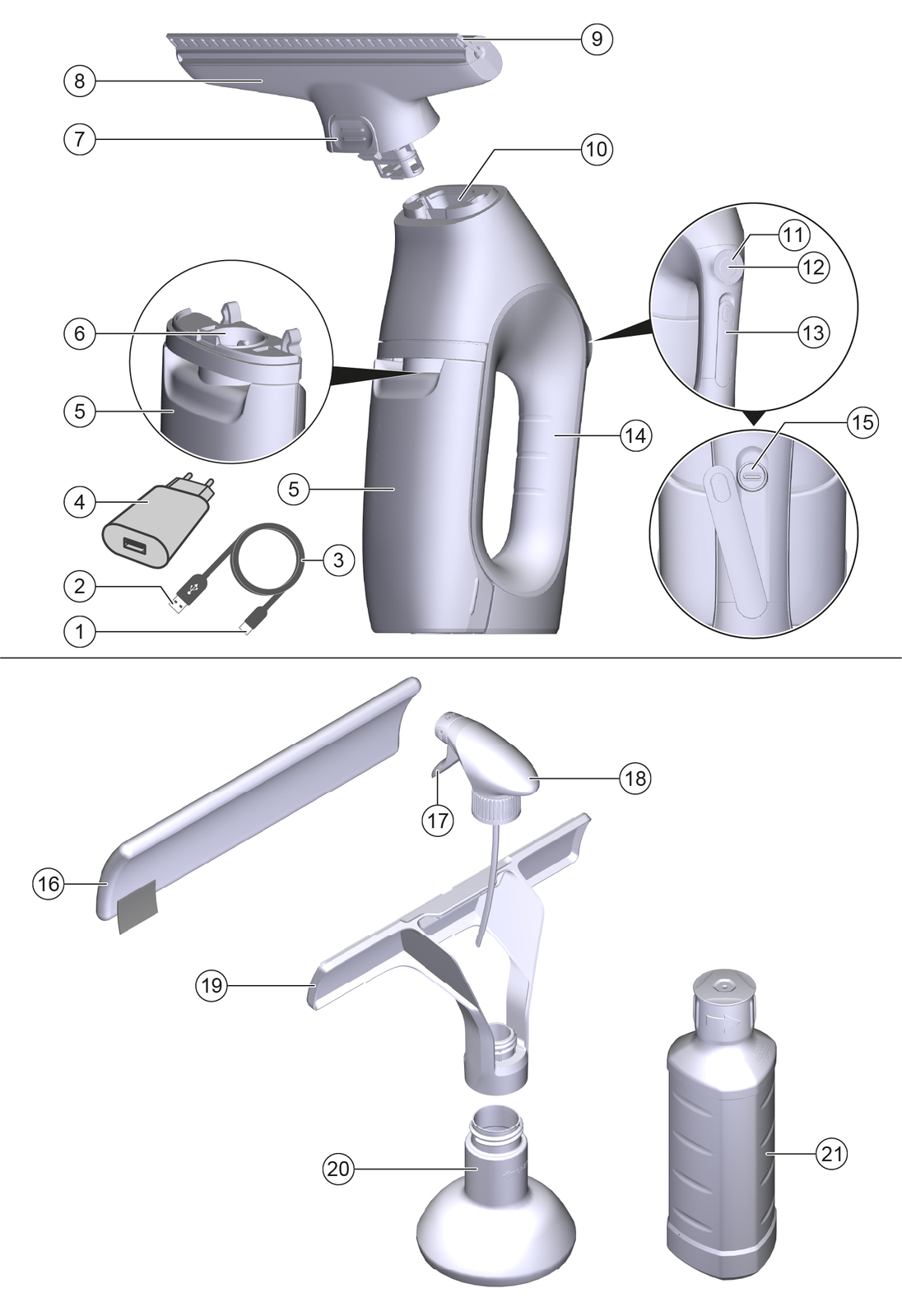
* Not included in the scope of delivery
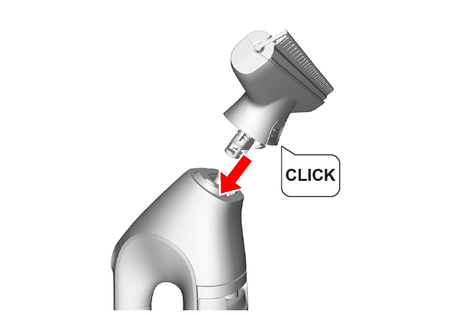
Insert the suction nozzle with the squeegee blade into the separator until the suction nozzle audibly latches into place.
The device is supplied with a discharged battery. Fully charge the battery before using the device for the first time.
Charging the battery:
Release the cover of the charging socket from the device and swing it to the side.
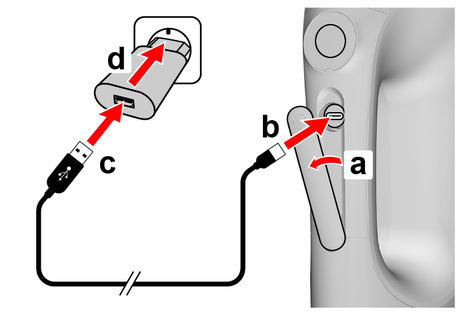
Plug the USB-C plug of the charging cable into the charging socket.
Plug the USB-A plug of the charging cable into the charger.
Plug the charger into a mains socket.
The LED flashes during the charging process.
After charging
Pull the charger out of the mains socket.
Pull the USB-C plug out of the charging socket.
Swivel the cover of the charging socket upwards and press it firmly on the device.
The LED is constantly lit up when the battery is fully charged. If the charger remains plugged in, the LED goes out after 1 hour.
The device is ready for use.
Fit the spray head on the wiping attachment.
Attach the spray head to the wiping attachment.
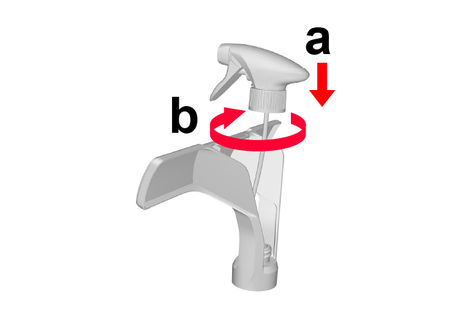
Tighten the union nut hand-tight.
Mix the detergent:
Fill approx. 7.78 oz. (230 ml) of clean water into the spray bottle.
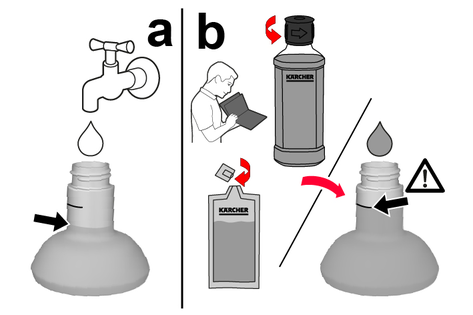
Slowly fill 1 cap (approx. 0.68 oz. / 20 ml) of detergent into the spray bottle up to the MAX marking.
Assemble the spray bottle:
Place the wiping attachment on the spray bottle.
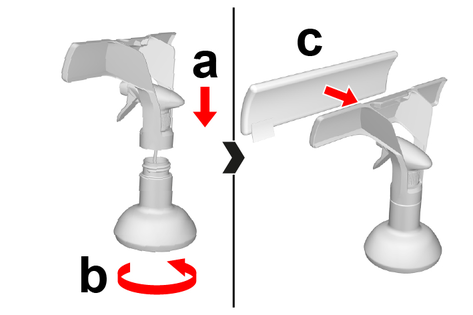
Screw the spray bottle onto the wiping attachment.
Fit the microfiber wipe cover on the wiping attachment.
Observe the following points to prevent streaks appearing:
Only glide the squeegee blade over the surface to be cleaned, do not press too hard.
Hold the device at the correct angle to the surface to be vacuumed. The distance between the lower end of the device and the surface should be approx. 4 in. (10 cm)
Use only a KÄRCHER detergent because this is specially developed for use with the device.
Spray a sufficient amount of detergent on the surface so that the surface is not too dry.
Clean the squeegee blade regularly, see Cleaning the squeegee blade and suction nozzle.
Replace the squeegee blade when worn, see Cleaning the squeegee blade and suction nozzle.
Do not use the device on very warm / cold or hot / frozen surfaces.
Apply the detergent:
Turn the spray nozzle to the "ON" position.
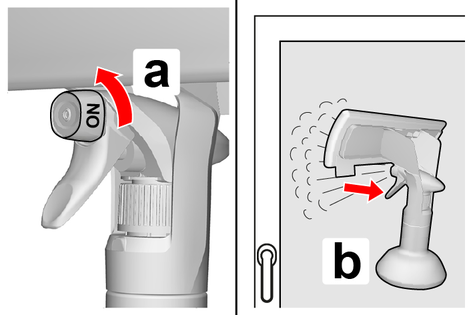
Press the spray lever and spray the detergent evenly onto the surface to be cleaned.
Loosen the dirt using the microfiber wipe cover.
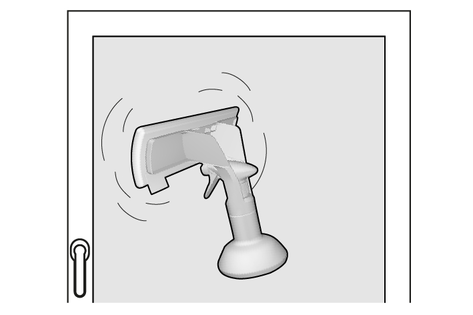
Press the ON /OFF button.
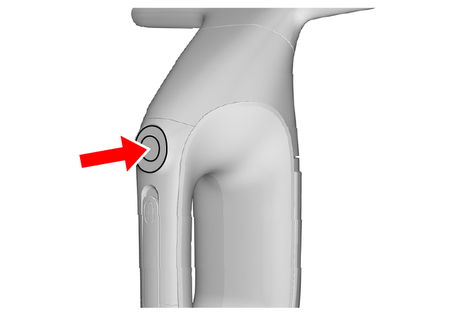
The device switches on.
The LED lights up.
Pull the squeegee blade over the surface to be cleaned to vacuum up the waste water.
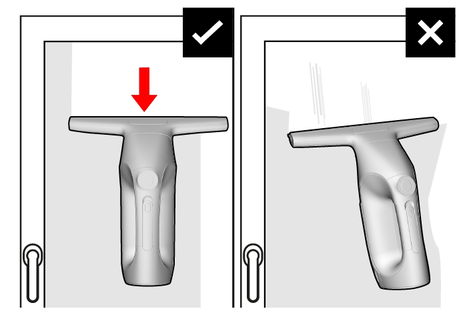
Only work with the device until the MAX mark of the waste water tank is reached. Switch off the device and empty the waste water tank, see Emptying the waste water tank.
The LED starts to flash when the battery is low. The device then switches off after a certain amount time.
Hard-to-reach surfaces can be vacuumed both horizontally and above head height to a limited extent.
Press the ON /OFF button.
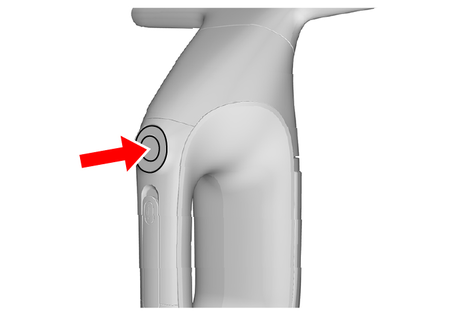
The device switches off.
The LED goes out.
Place the device on a level surface.
Empty the waste water tank as soon as it is filled up to the MAX marking.
Switch off the device.
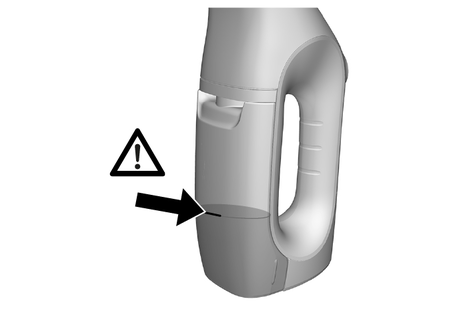
Removing the waste water tank:
Disengage the waste water tank.
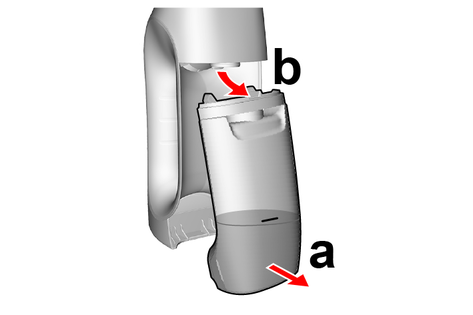
Remove the waste water tank.
Empty the waste water tank.
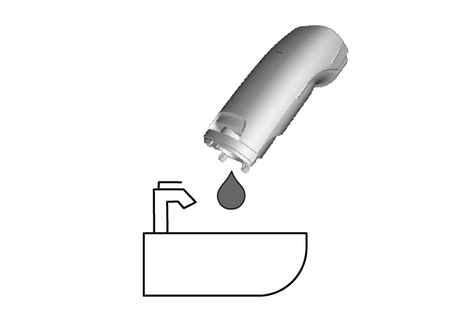
Install the waste water tank in reverse order.
Switch off the device.
Clean the waste water tank, see Cleaning the waste water tank.
Clean the microfiber wipe cover, see Cleaning the microfiber wipe cover.
Clean the squeegee blade and the suction nozzle, see Cleaning the squeegee blade and suction nozzle.
Allow the device to dry.
Assemble the device.
Charge the battery, see Battery charging.
Risk of injury, risk of damage!
Be aware of the weight of the device during transportation.
Stow or secure the device in accordance with the applicable guidelines so that it does not slide or jostle around during transport.Stow or secure the device so that it does not slide or jostle around in the vehicle when accelerating, braking, cornering or in the event of an accident.
Store the cleaned device upright in a clean, dry place that is protected from dust.
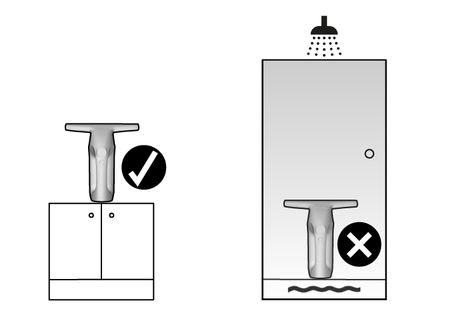
Improper cleaning
Risk of fire, injury, electric shock
Switch off the device.Pull the charging cable out of the charging socket.Never clean the device under running water.Empty the waste water tank, see Emptying the waste water tank.
Removing the lock:
Turn the lock to release the lock.
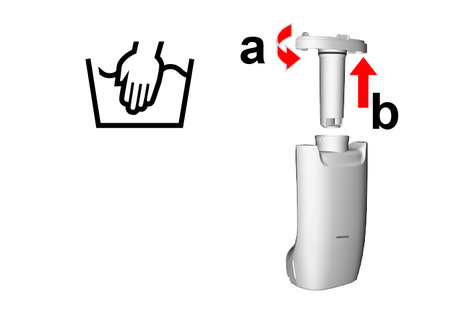
Pull the lock out of the waste water tank.
Clean the waste water tank and the cap by hand.
Put the cap back on the waste water tank.
Insert the waste water tank into the device.
Switch off the device.
Pull out the squeegee blade and remove the suction nozzle:
Pull the squeegee blade sideways out of the suction nozzle.
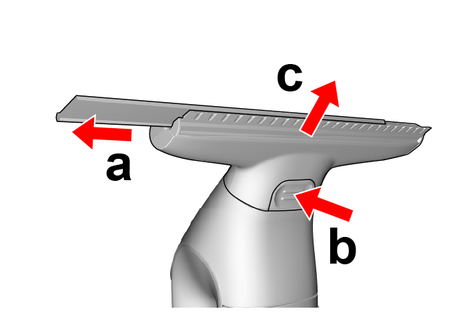
Press the unlocking button.
Slowly pull the suction nozzle from the separator.
Clean the squeegee blade and suction nozzle under running water.
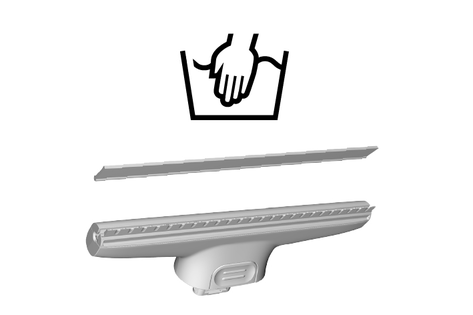
After drying, pull the squeegee blade into the suction nozzle from the side.
Mount the suction nozzle, see Mounting the suction nozzle.
Remove the microfiber wipe cover.
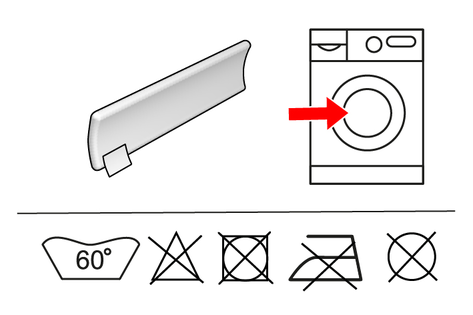
Wash the microfiber wipe cover under running water.
The microfiber wipe cover can be alternatively cleaned in a washing machine at temperatures of up to 140 °F (60 °C).
Observe the following instructions on caring for the device:
Do not use fabric softeners.
Do not bleach the microfiber wipe cover.
Do not dry the microfiber wipe cover in a dryer.
Do not iron the microfiber wipe cover.
The battery has reached the end of its service life if the device constantly switches off after a short period of operation and the battery needs to be charged.
Risk of explosion and fire if non-approved batteries or battery packs are used!
Severe injuries and/or material damage.
Replace damaged and worn batteries or battery packs exclusively with batteries or battery packs approved by Kärcher.Removing the battery:
Unscrew the screw.
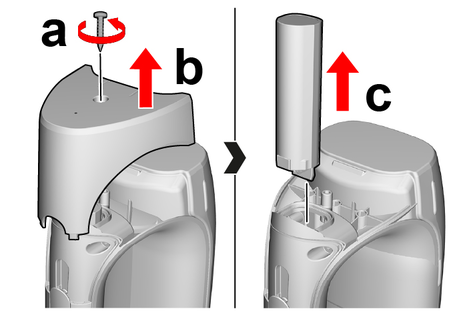
Remove the casing.
Remove the battery.
Install the new battery in the reverse order.
Dispose of the battery in the correct manner.
 WARNING | |
This device contains Lithium-Ion rechargeable batteries. The Lithium-Ion batteries must be removed and disposed of in accordance with the applicable federal and state regulations. Please note the following RBRC™ SEAL information. |  |
THE RBRC SEAL™
The RBRC seal™ (Rechargeable Battery Recycling Corporation) seal on the Li-Ion battery (or rechargeable battery) indicates that KÄRCHER have already paid the costs for recycling the battery (or rechargeable battery) at the end of its service life. In collaboration with KÄRCHER and other battery manufacturers, the RBRC™ has established a program in the USA making it easer to collect used Li-Ion batteries. Help to protect our environment and preserve our natural resources by bringing the used battery to an authorized KÄRCHER Service Center or your local recycling company. RBRC™ is a registered trademark of the Rechargeable Battery Recycling Corporation.
Remove the rechargeable battery from the device before disposal, see Replacing the rechargeable battery.
Do not throw the battery into a fire or into water.
The device can be recycled because KÄRCHER devices are made of high-quality recyclable materials.
The batteries must be recycled or disposed of in accordance with the local laws and regulations.
Malfunctions often have simple causes that you can remedy yourself using the following overview. When in doubt, or in the case of malfunctions not mentioned here, please contact your authorized Customer Service.
With increasing aging, the capacity of the battery will decrease even with good care, so that even when fully charged, the full run time is no longer achieved. This is not a defect.
The device does not work
Cause:
The battery is not fully charged.
Remedy:
Charge the battery, see Battery charging.
Cause:
The device is defective.
Remedy:
Contact the Service department.
The spray bottle is not working
Cause:
There is no water/detergent in the spray bottle.
Remedy:
Fill the spray bottle with water/detergent, see Preparing the spray bottle.
Cause:
The pump mechanism in the spray head is defective.
Remedy:
Contact the Service department.
Streaks occur during the cleaning process
Remedy:
To prevent the formation of streaks, see Starting operation.
LED code | Description | Troubleshooting |
The LED flashes (long on - short off). | The battery is almost discharged. |
|
The LED flashes (short on - long off). | The battery is discharged. |
|
The LED flashes quickly. | During operation: The device switches off, the suction turbine is overheated or blocked. |
|
During charging: Charging not possible. |
|
The device does not work
Cause:
The battery is not fully charged.
Remedy:
Charge the battery, see Battery charging.
Cause:
The device is defective.
Remedy:
Contact the Service department.
The spray bottle is not working
Cause:
There is no water/detergent in the spray bottle.
Remedy:
Fill the spray bottle with water/detergent, see Preparing the spray bottle.
Cause:
The pump mechanism in the spray head is defective.
Remedy:
Contact the Service department.
Streaks occur during the cleaning process
Remedy:
To prevent the formation of streaks, see Starting operation.

2-2-SC-A5-GS-02620